Guides › Mac clipboard
How to see clipboard history on Mac
Updated 9 October 2026 · by Vistaar Studio
Short answer: on macOS Tahoe 26 or later, press ⌘ Space to open Spotlight, then ⌘ 4. You'll see what you've copied recently, and you can search it. On macOS Sequoia or earlier, the Mac only remembers the last thing you copied (Finder › Edit › Show Clipboard), so you need a clipboard manager app for a real history.
For years "where is my clipboard history?" had a frustrating answer on the Mac: there wasn't one. That changed with macOS Tahoe. Below is how the built-in history works, its limits, what to do on an older Mac, and when a dedicated clipboard manager is worth it.
First, check which macOS you have
Click the Apple menu › About This Mac. If it says macOS Tahoe 26 (or later), follow the next section. If it says Sequoia, Sonoma or older, skip to older versions of macOS.
See clipboard history on macOS Tahoe (built in)
- Press ⌘ Space to open Spotlight.
- Press ⌘ 4, or click the Clipboard button at the right of the search field.
- The first time, macOS asks whether to allow Clipboard results. Click Allow (Apple's wording may say Enable).
- Type to search your copies. To use one, double-click it to paste where your cursor was, or click the copy icon beside it (or select it and press ⌘ C), then paste with ⌘ V.
It saves text (as plain text, without formatting), images and screenshots you copy, files copied in the Finder, and links.
How long it keeps your copies
By default Spotlight keeps clipboard history for 8 hours, then older copies drop off the end of the list. Since macOS Tahoe 26.1 you can change this in System Settings › Spotlight: scroll to the clipboard option at the bottom and choose 30 minutes, 8 hours or 7 days. The same place has a button to clear clipboard history, and a switch to turn the feature off entirely.
To clear it quickly
Open Spotlight, press ⌘ 4, click the More button (the circle with three dots) next to the search field and choose Clear History.
What it doesn't save
- Passwords from Apple's Passwords app are left out. Other password managers may behave differently, so test yours before trusting it.
- Very long text (roughly 16,000+ characters) isn't kept.
- Objects such as shapes or tables copied from Pages, Keynote or Numbers.
- Copies from your iPhone or iPad via Universal Clipboard. You can paste the latest one, but it isn't added to the history.
- Formatting. Bold, links and fonts are stripped; you get plain text back.
On macOS Sequoia, Sonoma or older
Older versions of macOS hold exactly one item on the clipboard. Copy something new and the previous copy is gone. You can still look at that one item:
- Finder: click the desktop or a Finder window, then choose Edit › Show Clipboard. A small window shows what's on the clipboard right now.
- Terminal: type
pbpasteand press Return to print the current clipboard text.
Neither shows anything you copied before that. If you want earlier copies back, you have two options: update to macOS Tahoe if your Mac supports it, or install a clipboard manager.
Built-in history vs a clipboard manager
| Finder › Show Clipboard | Spotlight (Tahoe) | Clipboard manager app | |
|---|---|---|---|
| How many copies | Only the last one | Recent copies | Long history |
| How long | Until you copy again | 30 min, 8 hours or 7 days | Depends on the app |
| Search | No | Yes | Usually |
| Pin favourites | No | No | Usually |
| Keeps formatting | Yes (one item) | No, plain text | Depends on the app |
| Works on older macOS | Yes | No, Tahoe 26+ | Depends on the app |
For many people, Spotlight's history is enough: you copied something an hour ago and want it back. A clipboard manager earns its place when you reuse the same snippets every week (addresses, email replies, colour codes, code), need copies from days ago, want them organised, or are on a Mac that can't run Tahoe.
Using a clipboard manager: Desk Buddy
We make one, so take this part with that in mind. Desk Buddy is a clipboard manager for Mac with a small character, Buddy, who lives at the edge of your screen and keeps everything you copy.
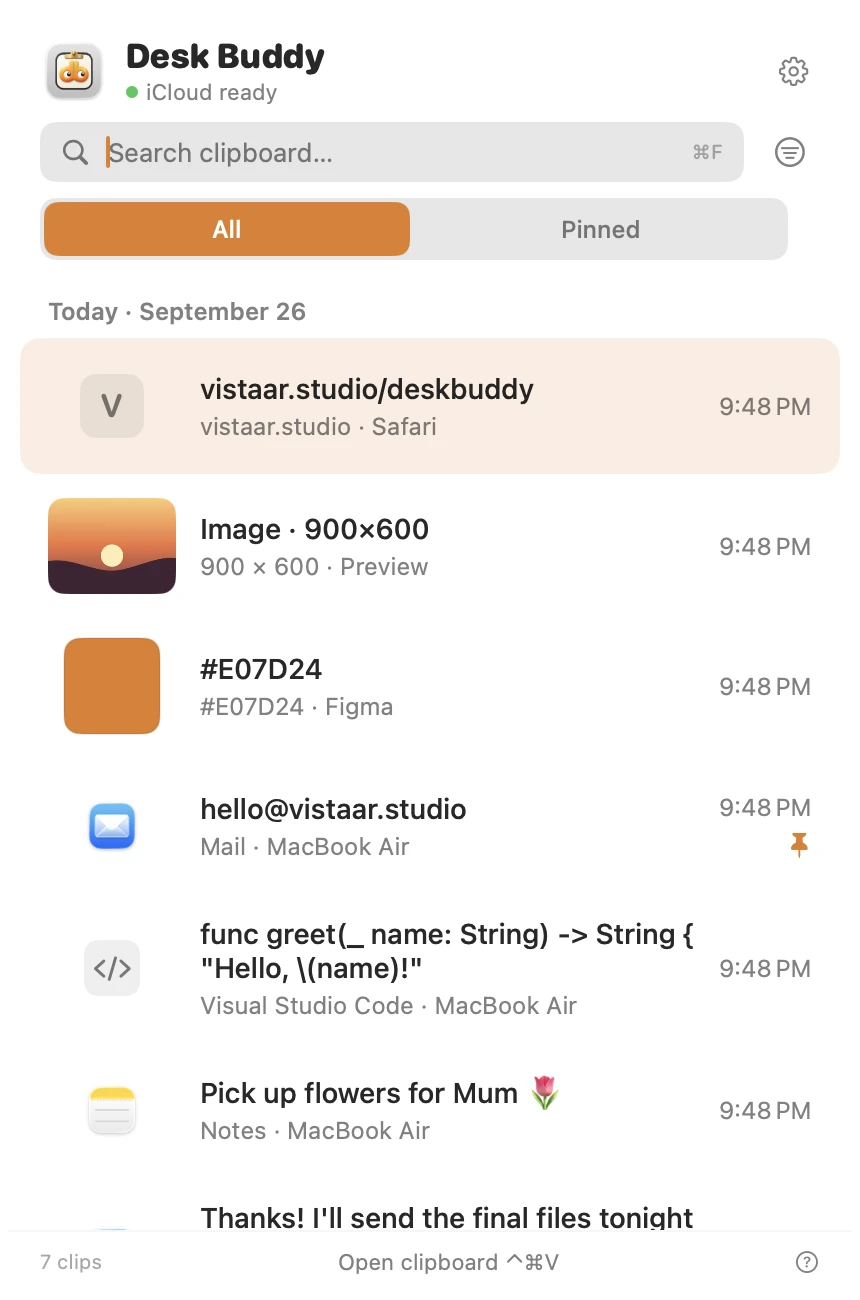
- Press ⌃ ⌘ V (or click the menu-bar icon, or Buddy) to open your history, then click a copy to paste it where you were typing.
- Keeps text, links, images, colours, code and files, and shows which website or app each copy came from, with its icon.
- Search, pin the things you reuse, and group them into boards.
- Optional sync of your clipboard history between your Macs through your own iCloud.
- Copies from password managers are left out, and copies other apps mark as private are never saved.
Desk Buddy is coming soon to the Mac App Store: a free download with a 7-day free trial, then a $9.99 in-app unlock. It needs macOS 14 or later, so it also works on Macs that can't run Tahoe. Meet Desk Buddy →
Tips for a safer clipboard history
- If you copy one-time codes or bank details often, choose the 30 minutes setting in Spotlight, or clear the history after.
- Use your password manager's autofill instead of copying passwords where you can.
- On a shared Mac, remember anyone at the keyboard can press ⌘ Space, ⌘ 4.
FAQ
Does a Mac have a clipboard history?
Yes, from macOS Tahoe 26 onwards: ⌘ Space, then ⌘ 4. On Sequoia and earlier, the Mac only remembers the last thing you copied.
How long does Spotlight keep clipboard history?
Eight hours by default. Since Tahoe 26.1 you can pick 30 minutes, 8 hours or 7 days in System Settings › Spotlight.
How do I clear clipboard history on Mac?
In Spotlight, press ⌘ 4, click More beside the search field and choose Clear History. You can also clear it or turn it off in System Settings › Spotlight.
Are passwords saved in Mac clipboard history?
Passwords copied from Apple's Passwords app are left out. Other password managers may differ, so check yours.
Can I see clipboard history from my iPhone on my Mac?
You can paste the latest iPhone copy with Universal Clipboard, but those copies aren't saved into the Mac's clipboard history.
Where is the clipboard on a Mac?
In the Finder, choose Edit › Show Clipboard. It shows only the item on the clipboard right now.