Guides › Clipboard
How to sync the clipboard between two Macs
Updated 12 October 2026 · by Vistaar Studio
Short answer: macOS does it for you with Universal Clipboard. Sign in to the same Apple Account on both Macs, turn on Wi-Fi and Bluetooth, and switch on Handoff in System Settings › General › AirDrop & Handoff. Copy on one Mac, then paste on the other as usual. It only carries your latest copy, for a short time; to have your whole clipboard history on both Macs you need a clipboard manager that syncs.
If you have a MacBook for travel and an iMac or Mac mini on the desk, this is one of those small things that saves a surprising amount of fiddling: no emailing yourself a link, no saving a screenshot to a shared folder just to move it two feet. Here's how to set it up, why it sometimes doesn't work, and what to do when you need more than the last thing you copied.
Turn on Universal Clipboard
Do this on both Macs:
- Open System Settings and click your name at the top. Make sure both Macs show the same Apple Account.
- Turn on Wi-Fi and Bluetooth (from Control Centre or System Settings).
- Go to System Settings › General › AirDrop & Handoff and turn on Allow Handoff between this Mac and your iCloud devices. It's on by default, but it's the first thing to check.
Now copy something on one Mac with ⌘ C and press ⌘ V on the other. Text, links, images and files all work. The same setting also works between a Mac and an iPhone or iPad.
What Universal Clipboard doesn't do
- It's one item, not a history. Only the most recent copy travels. Copy something else on either device and the earlier one is gone.
- It doesn't last. Apple says the copy stays available "briefly", so paste it within a minute or two.
- The Macs have to be near each other. It uses Bluetooth to notice the other device, so a Mac at home and one at the office won't share a clipboard.
- Same Apple Account only. It won't work between your Mac and a colleague's, or between your personal and work Apple Accounts.
- It's not in Spotlight's clipboard history. macOS Tahoe's built-in clipboard history (⌘ Space, then ⌘ 4) leaves out items that arrived through Universal Clipboard, and that history lives on each Mac separately. More in our guide to seeing your clipboard history on Mac.
When Universal Clipboard isn't working
Work down this list; most problems are fixed by the first three.
- Paste sooner. If you copied, got distracted and came back five minutes later, it has likely expired. Copy again.
- Check the Apple Account on both Macs. A Mac signed in with an old or work account is the most common cause.
- Turn Handoff off and on again on both Macs, in AirDrop & Handoff settings.
- Toggle Wi-Fi and Bluetooth off and on, and bring the Macs closer together.
- Install updates and restart both Macs. Apple's own advice, and it clears a lot of Continuity glitches.
- Check what you're copying. Some apps put content on the clipboard in their own private format, and password managers often clear or hide what they copy, so it may not appear on the other Mac.
Other ways to move things between Macs
When Universal Clipboard isn't an option (different accounts, Macs far apart, or you want to keep the item):
| Way | Good for | Needs |
|---|---|---|
| AirDrop | Files, photos, links | Macs nearby; works between different Apple Accounts |
| Notes with iCloud | Text and snippets you want to keep | Same Apple Account; works anywhere with internet |
| Messages to yourself | Quick links and short text | iMessage on both Macs |
| iCloud Drive folder | Larger files and screenshots | Same Apple Account; internet |
| Clipboard manager with sync | Your whole copy history on every Mac | An app that supports it |
Sync your whole clipboard history
Universal Clipboard is about the next paste. A clipboard manager is about every paste: it keeps a searchable list of what you've copied, so you can find the address from this morning or the code snippet from last week. Some of them can also sync that list between your Macs, so a link you copied on the MacBook on the train is waiting in the history on your desk Mac. That works across distance, because it goes through the internet rather than Bluetooth.
A few things to check before you pick one:
- Where the history goes. iCloud-based sync keeps it in your own Apple Account; other apps use their own servers and an account.
- What it leaves out. A good manager skips passwords from password managers and anything apps mark as private.
- Mac only, or iPhone too. Paste, for example, syncs across Mac, iPhone and iPad. Others are Mac-only.
Our comparison of the best clipboard managers for Mac covers prices and which ones sync.
Clipboard history that follows you between Macs: Desk Buddy
We make one, so take this part with that in mind. Desk Buddy is a clipboard manager for Mac with a small character, Buddy, who lives at the edge of your screen and keeps everything you copy.
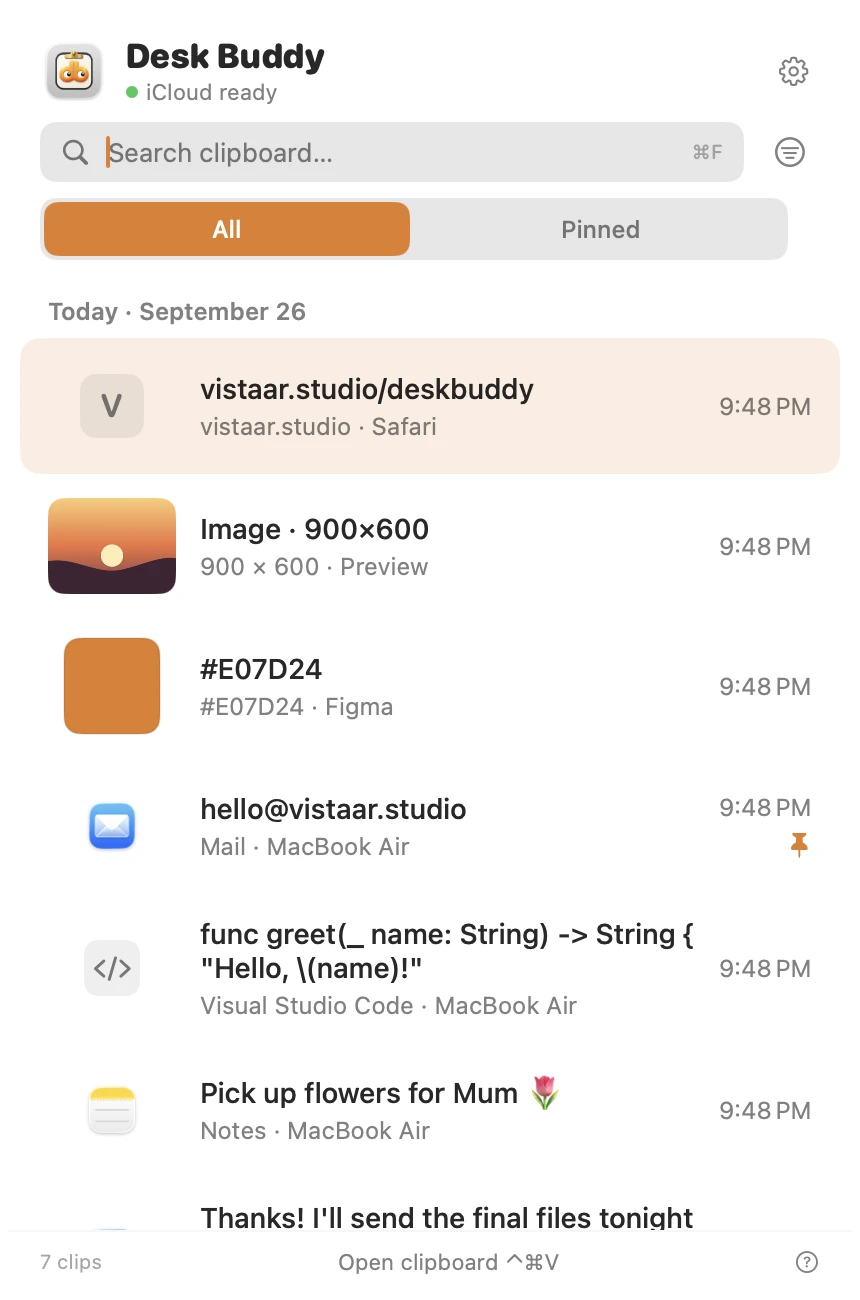
- Keeps your clipboard history: text, links, images, colours, code and files. Search it, pin favourites, sort copies into boards.
- Optional sync of the history between your Macs through your own iCloud. Sign in to the same Apple Account on both Macs, turn on iCloud Drive, and switch on sync in Desk Buddy's Settings.
- Press ⌃ ⌘ V (or click the menu-bar icon, or Buddy) and click a copy to paste it where you were typing.
- Shows which website or app each copy came from. Password managers are left out of history, and copies other apps mark as private are never saved.
It's Mac only; there's no iPhone version. For a quick Mac-to-iPhone paste, Universal Clipboard is still the tool.
Desk Buddy is available now from vistaar.studio as Desk Buddy Complete: $5 for 1 Mac (₹499 in India), paid up front, instant download. A Mac App Store edition is coming soon: a free download with a 7-day free trial, then a $9.99 in-app unlock. It needs macOS 14 or later. Meet Desk Buddy →
FAQ
How do I copy on one Mac and paste on another?
Same Apple Account on both, Wi-Fi and Bluetooth on, and Handoff on in System Settings › General › AirDrop & Handoff. Then copy and paste as usual, with the Macs near each other.
Why is Universal Clipboard not working between my Macs?
Usually a different Apple Account, Handoff switched off, or the copy expired. Check those, toggle Wi-Fi and Bluetooth, then update and restart both Macs.
Does Universal Clipboard sync clipboard history?
No, only your latest copy, briefly. For a shared history you need a clipboard manager with sync.
Does the macOS Tahoe clipboard history sync between Macs?
Spotlight's clipboard history is kept on each Mac, and it leaves out items that arrived through Universal Clipboard.
Can I copy and paste between Macs with different Apple Accounts?
Not with Universal Clipboard. Use AirDrop, Messages, a shared note or a shared folder.