Guides › Mac clipboard
The best clipboard manager for Mac in 2026
Updated 19 October 2026 · by Vistaar Studio
Short answer: if you only need to find something you copied a few hours ago, use the clipboard built into Spotlight (macOS Tahoe and later: ⌘ Space, then ⌘ 4). For a free, fast, no-frills app, get Maccy. If you want your history on your iPhone too, Paste is the most complete, at a subscription price. Already using Raycast or Alfred? Turn on their clipboard history before buying anything.
A disclosure first: we make a clipboard manager, Desk Buddy, and it's covered at the end of this page, clearly labelled. Everything else here was checked on each app's own website or Mac App Store listing in October 2026. Prices change, so check before you buy. We've kept to facts you can verify rather than "speed scores" or star ratings.
What to look for
- What it keeps. Some managers keep only text. If you copy screenshots, images or files, make sure they're saved too.
- How fast you get back to a copy. A keyboard shortcut, type-to-search, and paste-on-click matter more than any feature list.
- Pinning. Addresses, email replies and code snippets you reuse every day should stay put instead of scrolling away.
- Privacy behaviour. A clipboard manager sees everything you copy. Look for one that skips password managers and lets you exclude apps.
- Sync. Do you need history on a second Mac, or on your iPhone? That narrows the list quickly.
- Price model. Free, one-time, or subscription. For something you use dozens of times a day, all three can be fair; just know which you're signing up for.
At a glance
| Price | Keeps images | Pinning | Sync | |
|---|---|---|---|---|
| Spotlight (built in) | Free | Yes (also files) | No | No |
| Maccy | Free (or $9.99 App Store) | Yes | Yes | No |
| Paste | Subscription, $29.99/yr | Yes, and files | Yes (Pinboards) | Mac, iPhone, iPad |
| Raycast | Free; Pro $8/mo yearly | Yes | Yes | Pro only |
| Alfred | Powerpack, from £34 | Yes, and file links | Not stated | Not stated |
| CopyClip 2 | $7.99 | Text only | Yes | Not stated |
"Not stated" means the official page doesn't say, not that the feature is missing. Raycast Pro is $10 a month, or $96 a year.
1. Spotlight clipboard: best if you only need the basics
Since macOS Tahoe 26, Spotlight remembers what you copy. Press ⌘ Space, then ⌘ 4 (or click the clipboard button), and you'll see recent copies (text, images and copied files) you can search and copy again. The first time, Spotlight asks you to allow clipboard results. It's free and already on your Mac.
Good for: "what was that link I copied this morning?" Not for: pinned snippets, formatted text (it pastes plain text), or long-term history (it keeps 8 hours by default; macOS 26.1 adds a 7-day option in System Settings › Spotlight). It also isn't available on older versions of macOS. Our guide to seeing clipboard history on Mac covers the settings and its limits.
2. Maccy: best free clipboard manager
Maccy is small, fast and open source (MIT licence). Press ⇧ ⌘ C, start typing to filter, and press Return to paste. You can pin items, ignore particular apps or kinds of copies, and paste without formatting. It needs macOS Sonoma 14 or later and keeps everything on your Mac.
It's free from maccy.app; the Mac App Store version costs $9.99 and is the same app, a way to support the developer and get automatic updates. The project warns that maccy.app is its only official website, so don't download it from look-alike sites.
Good for: anyone who wants a keyboard-first list and nothing more. Not for: people who want sync or a visual layout.
3. Paste: best for Mac + iPhone
Paste is the most polished, feature-packed option: unlimited history of text, links, images and files, Pinboards to organise snippets, a Paste Stack for pasting several items in order, and search that also finds text inside screenshots. History syncs through your own iCloud between Mac, iPhone and iPad. It needs macOS 14 or later.
It's a free download with a 7-day trial, then a subscription: $29.99 a year on both its website and the Mac App Store, with monthly, family and lifetime options listed on the App Store. It's also included in Setapp.
Good for: heavy users who live across Apple devices. Not for: anyone who doesn't want another subscription.
4. Raycast: best if you already use a launcher
Raycast is a Spotlight replacement with clipboard history built in. The free plan keeps three months of text, images, colours and links; Pro ($10 a month, or $96 a year) adds unlimited history and Cloud Sync across Macs. You can pin items and set your own hotkey, and Raycast says history is stored encrypted on your disk.
Good for: people who want one tool for launching apps, snippets and clipboard. Not for: anyone who just wants a clipboard; Raycast is a lot of app to learn for one feature.
5. Alfred: if you already own the Powerpack
Alfred's clipboard history is part of the paid Powerpack (from £34). It keeps text, images and file links, is off by default for privacy, and lets you keep clips for 24 hours, 7 days, 1 month or 3 months. Press ⌘ S on a clip to save it as a reusable snippet.
Good for: existing Alfred users; switch it on in Alfred's Features › Clipboard History. Not for: buying just for the clipboard.
6. CopyClip 2: simple text-only history
CopyClip 2 from FIPLAB is a $7.99 menu-bar app that keeps up to 9,999 text clippings, with search and pinning. It runs on macOS 11.5 or later, which makes it an option for older Macs. It doesn't keep images.
Our app: Desk Buddy
We make this one, so weigh our words accordingly. Desk Buddy is a clipboard manager for Mac with a small character, Buddy, who lives at the edge of your screen and keeps everything you copy. We built it for people who find keyboard-only lists a bit cold.
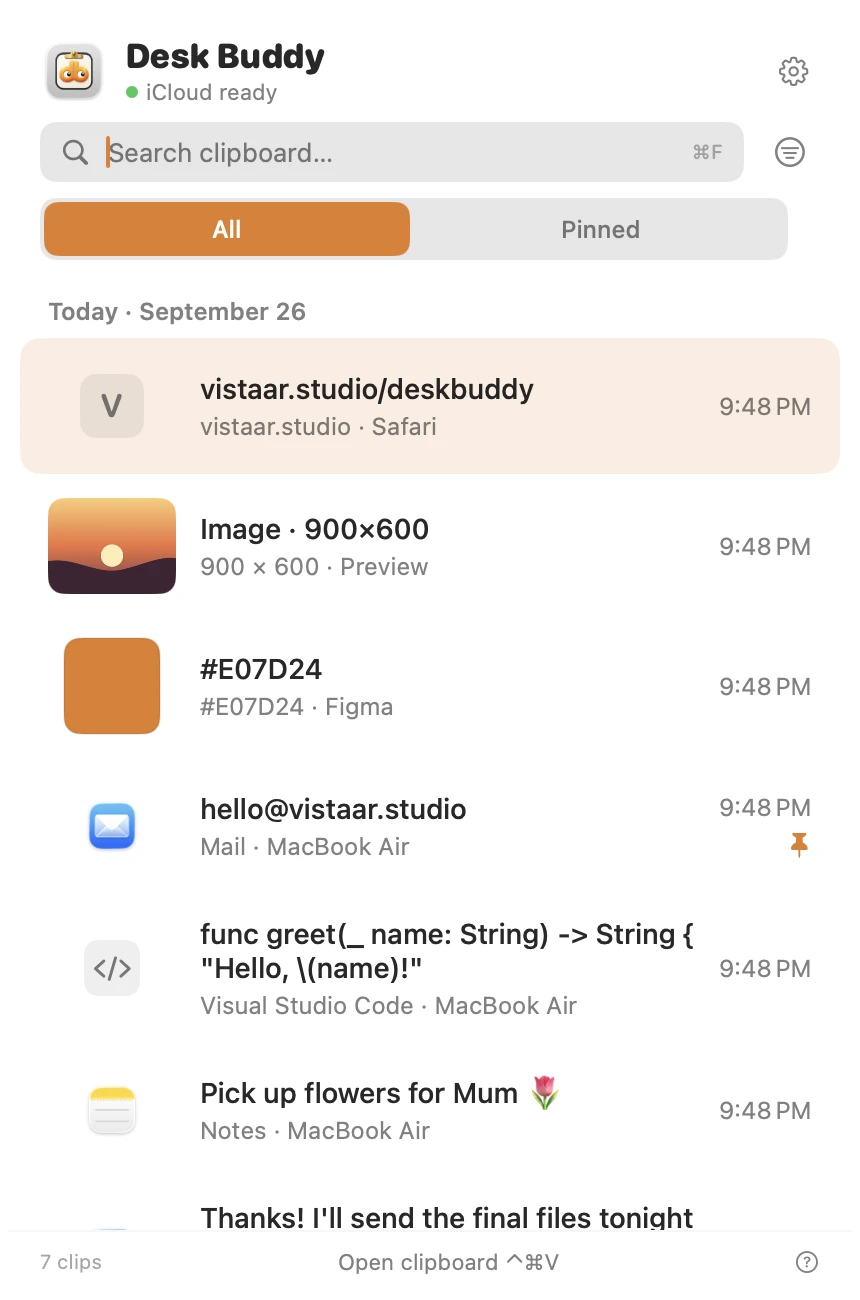
- Keeps text, links, images, colours, code and files. Search, pin, and sort copies into boards.
- Press ⌃ ⌘ V (or click the menu-bar icon, or Buddy) and click a copy to paste it where you were typing.
- Shows which app or website each copy came from, with its icon.
- Optional sync of your history between your Macs, through your own iCloud. (Mac only; there's no iPhone app.)
- Password managers are left out of history, and copies other apps mark as private are never saved.
- Buddy has three faces, an outfit for your country, and gentle water, stretch and bedtime nudges you can make chatty, normal or quiet.
- Copy Text from Screen (in Desk Buddy Complete): press Control ⌘ 2, drag a box over anything on screen, and its text goes onto your clipboard and into your history.
Desk Buddy is available now from vistaar.studio as Desk Buddy Complete: $5 for 1 Mac (₹499 in India), paid up front, instant download. A Mac App Store edition is coming soon: a free download with a 7-day free trial, then a $9.99 in-app unlock. It needs macOS 14 or later. Meet Desk Buddy →
So which should you pick?
- You copy a few things a day: Spotlight. Don't install anything.
- You want free and fast: Maccy.
- You need history on your iPhone: Paste.
- You already use Raycast or Alfred: switch on their clipboard history first.
- You want something friendlier on screen, synced between your Macs: try Desk Buddy (available now from vistaar.studio; App Store edition coming soon).
FAQ
What is the best free clipboard manager for Mac?
Maccy: free and open source from maccy.app, with search and pinning. It opens with ⇧ ⌘ C.
Does the Mac have a built-in clipboard manager?
Yes, since macOS Tahoe 26: ⌘ Space, then ⌘ 4. It's fine for recent text, with no pinning, boards or sync.
Which Mac clipboard manager syncs with iPhone?
Paste, through your iCloud. Apple's Universal Clipboard only hands over the single latest copy to a nearby device; it isn't a history.
Is a clipboard manager safe to use with passwords?
Most skip copies that password managers mark as private, and many let you exclude apps. Check the settings, and prefer autofill over copying passwords.
Do I need a clipboard manager if I use Raycast or Alfred?
Probably not. Raycast includes it for free (three months of history), Alfred with the Powerpack.
How do I open clipboard history on a Mac?
Built in: ⌘ Space then ⌘ 4. In apps: ⇧ ⌘ C in Maccy, ⌃ ⌘ V in Desk Buddy, or the hotkey you set.