Guides › Mac clipboard
Paste vs Maccy: which clipboard manager should you use?
Updated 19 October 2026 · by Vistaar Studio
Short answer: pick Maccy if you want a free, tiny, keyboard-only clipboard history on one Mac. Pick Paste if you want your clipboard on your iPhone and iPad as well, plus Pinboards, a Paste Stack and search inside screenshots. That costs a subscription ($29.99 a year). Most people know within a day which style suits them.
A disclosure: we make a clipboard manager too, Desk Buddy. It gets a short, clearly labelled section at the end. Everything about Paste and Maccy below was checked on their official websites, Maccy's GitHub page and their Mac App Store listings on 18 October 2026. Prices change, so check before you pay.
Side by side
| Maccy | Paste | |
|---|---|---|
| Price | Free (open source, MIT); $9.99 on the App Store | 7-day trial, then $29.99/yr (monthly $2.49 on its site, $3.99 on the App Store; lifetime $99.99 on the App Store) |
| Opens with | ⇧ ⌘ C | ⇧ ⌘ V |
| Looks like | A compact menu under the menu bar | A strip of large preview cards along the bottom of the screen |
| History | Text and images; you choose how much it keeps | Unlimited: text, links, images, files |
| Pinning | Pin items to the top (⌥ P) | Pinboards you name and organise |
| Paste several in order | No | Yes, Paste Stack |
| Search text in screenshots | No | Yes |
| Sync | No (one Mac) | Mac, iPhone, iPad through your iCloud |
| Needs | macOS 14 Sonoma or later | macOS 14 or later |
| Download size | 2.4 MB | 165.3 MB |
Maccy: free, fast and keyboard-first
Maccy is what many Mac developers install on day one. It sits in the menu bar and does one job: remember what you copied and get it back quickly.
- Press ⇧ ⌘ C. A list of recent copies drops down.
- Start typing. The list filters as you type.
- Press Return to put the item back on the clipboard, or ⌥ Return to paste it straight into the app you were using. ⌥ ⇧ Return pastes it without formatting.
Other keys worth knowing: ⌥ P pins an item to the top, ⌥ ⌫ deletes one, and ⌥ ⌘ ⌫ clears everything that isn't pinned. Option-clicking the menu-bar icon pauses recording, which is handy before you copy something private.
Where it falls short: there's no sync at all, no folders or boards beyond pinning, and no way to paste a queue of items in order. The interface is deliberately plain. If you like the mouse more than the keyboard, it can feel bare.
Getting it: download it free from maccy.app or install it with brew install maccy, or buy the same app for $9.99 on the Mac App Store to support the developer and get updates automatically. The project warns that maccy.app is its only official website, so avoid look-alike download sites.
Paste: the polished all-rounder
Paste takes the opposite approach. Press ⇧ ⌘ V and a row of large cards slides up from the bottom of the screen, each showing a preview of what you copied: text, links, images and files. You can also paste one of your nine most recent items directly with ⌘ 1 to ⌘ 9.
- Pinboards keep snippets, links, colours and templates you reuse, sorted however you like. Teams can share them.
- Paste Stack lets you queue several items and paste them one after another, which is great for filling in forms.
- Search covers your whole history, including text inside screenshots and photos.
- Sync keeps the history in your own iCloud and shows it on your iPhone and iPad.
- Rules let you ignore passwords and sensitive apps.
Its website also advertises newer extras: suggestions of what you'll paste next, using Apple Intelligence on your Mac, and connections to AI tools like Claude, Codex and Cursor.
Where it falls short: the price. At $29.99 a year it's the most expensive mainstream clipboard manager, and the monthly price differs depending on where you buy ($2.49 on pasteapp.io, $3.99 through the App Store). The big card strip also covers part of your screen, which some people love and others find heavy. If you already pay for Setapp, Paste for Mac is included in it.
Which one fits you?
- You copy code, links and text all day on one Mac: Maccy. It's free and nothing is faster for keyboard people.
- You move between Mac and iPhone: Paste. Maccy can't do this at all, and Apple's Universal Clipboard only passes the single latest copy to a nearby device.
- You fill in the same forms or replies often: Paste, for Pinboards and Paste Stack.
- You hunt for screenshots by what's written in them: Paste.
- You're on an older Mac: neither. Both need macOS 14 Sonoma or later.
- You're on macOS Tahoe and copy only a few things a day: maybe neither. Spotlight now has a basic clipboard history: press ⌘ Space, then ⌘ 4. It keeps text (without formatting), images and copied files for a limited time, with no pinning or sync. Our clipboard history guide explains how long it keeps copies.
A fair way to decide: install Maccy first, since it costs nothing. If after a week you keep wishing you had something on your phone or a place to keep reusable snippets, start Paste's 7-day trial. You'll know before it bills you.
Switching from one to the other
Neither app imports the other's history, so treat a switch as a fresh start. Pin or copy out anything you rely on before you uninstall. Both use ⇧ ⌘ with a letter by default, which means they won't clash if you try both, but quit the one you're not testing so you don't record every copy twice. If a shortcut doesn't work, another app may already be using it; change it in the app's settings.
A third option: Desk Buddy (our app)
We make this one, so weigh our words accordingly. Desk Buddy sits between the two: more visual than Maccy, lighter on your wallet than Paste, with a small character, Buddy, who lives at the edge of your screen and keeps what you copy.
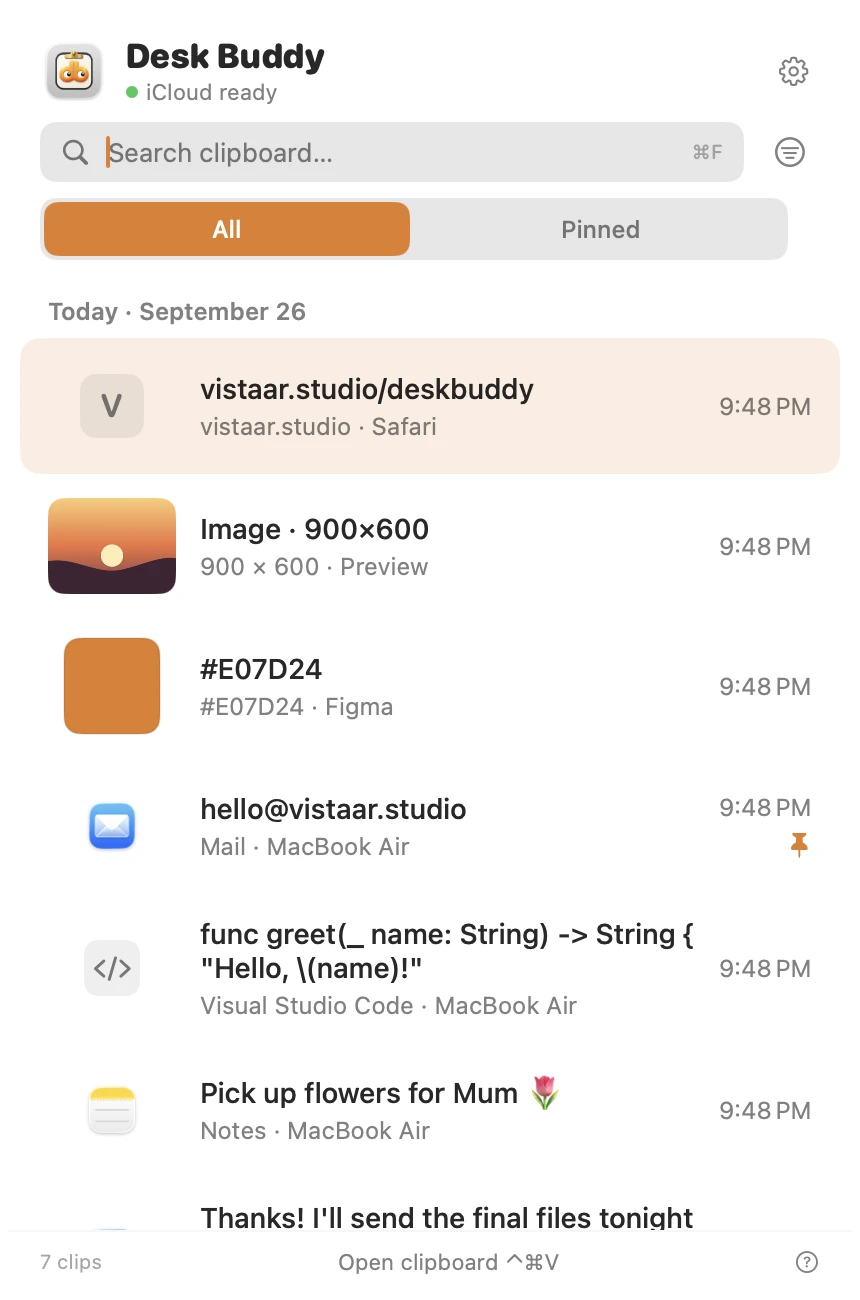
- Keeps text, links, images, colours, code and files, with search, pinning and boards.
- ⌃ ⌘ V (or the menu-bar icon, or clicking Buddy) opens the history; click a copy to paste it where you were typing.
- Shows which website or app each copy came from, with its icon.
- Optional sync between your Macs through your own iCloud. There's no iPhone app, so if you need your phone, Paste is the better pick.
- Password managers are left out of history.
- Copy Text from Screen (in Desk Buddy Complete): press Control ⌘ 2, drag a box over anything on screen, and its text goes onto your clipboard and into your history.
Desk Buddy is available now from vistaar.studio as Desk Buddy Complete: $5 for 1 Mac (₹499 in India), paid up front, instant download. A Mac App Store edition is coming soon: a free download with a 7-day free trial, then a $9.99 in-app unlock. Meet Desk Buddy →
FAQ
Is Maccy really free?
Yes. It's open source (MIT) and free from maccy.app, GitHub or Homebrew. The $9.99 App Store version is the same app; buying it supports the developer.
How much does Paste cost?
After a 7-day trial: $29.99 a year, or monthly ($2.49 on pasteapp.io, $3.99 on the App Store). The App Store also lists a $99.99 lifetime plan and a $59.99 family plan. Every plan covers Mac, iPhone and iPad.
Can Maccy sync clipboard history with my iPhone?
No. Maccy's history stays on the Mac. Paste syncs through your iCloud to iPhone and iPad.
What are the keyboard shortcuts?
Maccy: ⇧ ⌘ C to open, ⌥ Return to paste, ⌥ P to pin. Paste: ⇧ ⌘ V to open, ⌘ 1–9 for recent items. Both can be changed.
Can I run Paste and Maccy at the same time?
Yes, but both would record every copy. Test one at a time.
Do they save passwords I copy?
Both try not to. Maccy ignores copies that password managers mark as concealed; Paste lets you set rules to ignore passwords and sensitive apps. Autofill is still safer than copying passwords.