Guides › Clipboard
How to copy a color hex code from your screen on Mac
Updated 22 October 2026 · by Vistaar Studio
Short answer: open Digital Color Meter (Applications › Utilities, or search for it with ⌘ Space). Choose View › Display Values › as Hexadecimal and set the pop-up menu to Display in sRGB. Hover over the colour you want, anywhere on screen, and press ⇧ ⌘ C (Color › Copy Color as Text). Then paste it wherever you need it.
Matching a brand colour from a website, a logo in a PDF or a shade in someone's slide comes up all the time in design, front-end work, social posts and presentations. Every Mac has two free tools that can read any pixel on screen. The steps are quick, but there's one setting most people miss, and it's the reason "the hex code is slightly off". We'll cover that too.
1. Digital Color Meter (any pixel, anywhere)
Digital Color Meter has shipped with macOS for years and sits in Applications › Utilities. It shows the colour under your pointer, wherever the pointer is: a web page, a photo, a video, another app.
- Open Digital Color Meter.
- Choose View › Display Values › as Hexadecimal. (The other choices are as Decimal, as Percentage and as Float.)
- Click the pop-up menu in the window and choose Display in sRGB. This makes the numbers match what a website or most design tools expect. More on why below.
- Drag the Aperture Size slider all the way to the left so it measures a single pixel. A bigger aperture averages several pixels together.
- Move the pointer over the colour. The window shows a magnified view and the R, G and B values.
- Without clicking, press ⇧ ⌘ C (Color › Copy Color as Text). The values go onto the clipboard. Paste one into a note first so you can see the exact format you get.
Why the keyboard? Clicking would switch you to the app under the pointer. Keyboard shortcuts keep Digital Color Meter in charge while you aim:
| Shortcut | What it does |
|---|---|
| ⇧ ⌘ C | Copy Color as Text |
| ⌥ ⌘ C | Copy Color as Image (a swatch you can paste into a document) |
| ⌘ L | Lock Position, so you can let go of the mouse and read the values |
| ⌘ X / ⌘ Y | Lock only the horizontal or vertical position |
Aiming at a thin line or a small icon? Turn up View › Magnification (up to 8x) so you can see exactly which pixel is in the centre.
2. The Colors window eyedropper (gives you a ready-made hex code)
The standard Mac Colors window has its own eyedropper and a Hex Color # box, so you get a clean six-digit code to copy.
- Open an app that uses it, such as TextEdit, and choose Format › Font › Show Colors. (Pages, Keynote and many other Mac apps open the same window from their colour controls.)
- Click the magnifying glass (eyedropper) next to the colour swatch. The pointer becomes a magnifier.
- Move it over the colour anywhere on screen and click. The Colors window takes on that colour.
- Click the Color Sliders tab (the second icon at the top) and choose RGB Sliders from the pop-up menu.
- Select the code in the Hex Color # box and press ⌘ C.
You can drag the colour from the big swatch into the row of small squares at the bottom to keep it for later. Handy when you're collecting three or four brand colours.
Why your hex code is "slightly off" (and the fix)
Most current Macs have Display P3 screens, which show a wider range of colour than the sRGB standard used by the web. Digital Color Meter's Display native values option reports the numbers your screen is using, not the numbers in the original file. So a brand blue that's #1A73E8 in the website's CSS can read as something a few steps different in native mode.
- For websites, apps, social graphics and most design tools, measure with Display in sRGB.
- If you're matching something that was made in P3 (for example, in some iPhone or Mac app designs), choose Display in P3 instead.
- Measure a flat area of colour, not an edge. Text and icon edges are smoothed, so their pixels are blends of two colours.
- Photos, gradients and shadows don't have one "true" colour. Measure a few spots and pick the one that looks right.
- Night Shift and True Tone change what you see on the screen. If a colour looks odd to your eye, check whether either is on.
Even with all of that, a measured colour can be one or two values off the source. If you need the exact brand code, ask for the style guide or look in the website's CSS.
Turning RGB numbers into a hex code
If you've got decimal values (each from 0 to 255), a hex code is just those three numbers written as two hexadecimal digits each: red, then green, then blue. 255 is FF, 128 is 80, 0 is 00. Terminal will do the maths for you:
printf '#%02X%02X%02X\n' 26 115 232That prints #1A73E8. Swap in your own three numbers. (We ran it on macOS 26.2.)
Common problems
- The pointer moved when I went to copy. Press ⌘ L to lock the position first, then copy with ⇧ ⌘ C.
- The values keep changing. The aperture is probably bigger than one pixel, or you're over a gradient or a video. Shrink the aperture and lock the position.
- I pasted and got numbers I didn't expect. Check View › Display Values and the colour-space pop-up, then copy again. If you still get decimal numbers, convert them with the Terminal line above, or use the Colors window, which always shows a hex code.
- The colour looks different in my design app. Check that the document in that app uses the same colour profile (usually sRGB for web).
- I copied a hex code, then copied something else and lost it. The Mac clipboard only holds one thing. On macOS Tahoe, Spotlight's clipboard history (⌘ Space, then ⌘ 4) keeps recent text for a while. See how to see clipboard history on Mac.
Keep every colour you copy: Desk Buddy (our app)
We make Desk Buddy, so read this with that in mind. You don't need it to pick a colour; Digital Color Meter does that. It helps when you're copying lots of things in a row: a hex code, then a font name, then a link, then another colour. Desk Buddy is a clipboard manager that keeps a history of what you copy, including text, links, images, colours, code and files, and shows which website or app each copy came from.
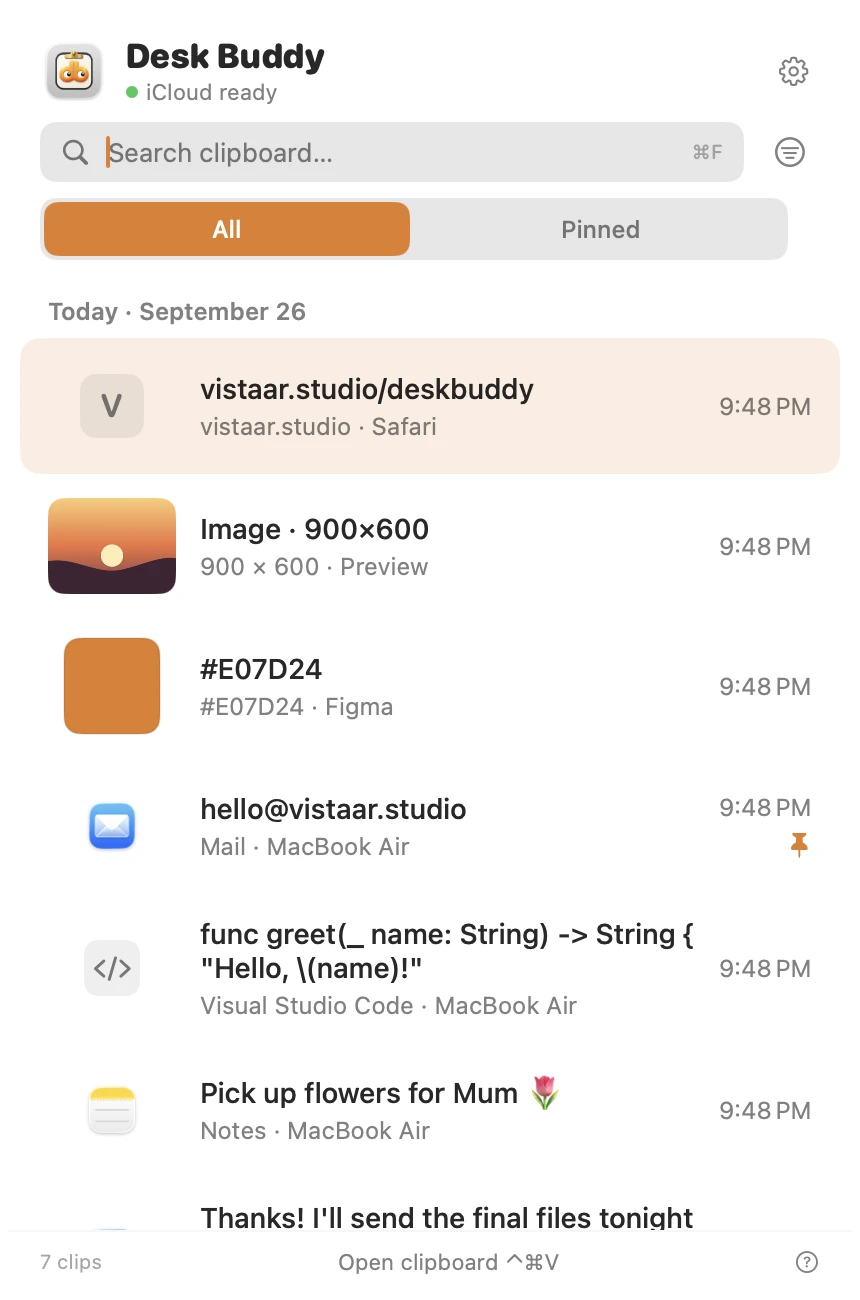
- Press Control ⌘ V (or click the menu-bar icon, or Buddy at the edge of your screen) to open the history, then click a copy to paste it where you were typing.
- Pin the brand colours you use every week, or group a project's colours, fonts and links into a board.
- Search the history to find a code you copied earlier.
- Optional sync of the history between your Macs through your own iCloud.
Desk Buddy is available now from vistaar.studio as Desk Buddy Complete: $5 for 1 Mac (₹499 in India), paid up front, instant download. A Mac App Store edition is coming soon: a free download with a 7-day free trial, then a one-time $9.99 unlock. It needs macOS 14 or later. Meet Desk Buddy →
FAQ
Does the Mac have a built-in colour picker?
Yes, two: Digital Color Meter in Applications › Utilities, and the Colors window (eyedropper plus a Hex Color box) in apps like TextEdit, Pages and Keynote.
How do I get a hex code in Digital Color Meter?
View › Display Values › as Hexadecimal, set the pop-up to Display in sRGB, hover, then ⇧ ⌘ C.
Why is the hex code slightly different from the designer's file?
Usually colour space. Measure in sRGB, use a one-pixel aperture, and avoid edges, shadows and gradients.
How do I copy a colour without moving the pointer away?
Stay on the keyboard: ⌘ L locks the position, ⇧ ⌘ C copies.
How do I convert RGB numbers to a hex code?
Write each value as two hex digits, or run printf '#%02X%02X%02X\n' R G B in Terminal with your numbers.
Can I keep a list of colours I've copied?
Save swatches in the Colors window's palette, or use a clipboard manager that keeps every hex code you copy.