Guides › Photos
Email attachment size limits 2026: Gmail, Outlook and more
Updated 21 November 2026 · by Vistaar Studio
Short answer: Gmail 25 MB (bigger files become a Google Drive link). Outlook.com 25 MB (2 GB when shared from OneDrive). iCloud Mail 20 MB, or up to 5 GB with Mail Drop, kept for 30 days. Yahoo Mail 25 MB in total per message. Work accounts on Microsoft 365 default to a 35 MB message.
For every row below we read the service's own help page and wrote down only what it says, with a link. Where the page gives no number, the cell says so. Checked 21 November 2026. These pages change, so follow the link before you rely on a figure.
The table
| Service | Limit | Over the limit | Official source |
|---|---|---|---|
| Gmail | 25 MB for personal accounts. Work and school accounts: set by the Google Workspace administrator | Gmail removes the attachment and adds it as a Google Drive link | Gmail Help |
| Outlook.com | 25 MB for attached files; 2 GB for OneDrive files | Microsoft suggests sharing the file from OneDrive instead | Microsoft Support |
| Microsoft 365 (Exchange Online, work email) | Default message size 35 MB to send, 36 MB to receive. Administrators can set 1 MB to 150 MB. Outlook for iOS and Android: 33 MB message | The message isn't delivered and the sender gets a non-delivery report | Microsoft Learn |
| iCloud Mail | 20 MB per message, incoming and outgoing | Up to 5 GB with Mail Drop turned on | Apple Support |
| Mail Drop (Apple Mail) | 5 GB; each attachment expires after 30 days. Doesn't count against iCloud storage | There is a 1 TB Mail Drop storage limit | Apple Support |
| Yahoo Mail | 25 MB for all attached files in one message, incoming and outgoing | Not stated on the page | Yahoo Help |
| Documents: 2 GB. Videos: default limit 100 MB at 720p on faster connections, 64 MB at 480p on slower ones. Photos: no official figure published; check the help page | Not stated on the page | WhatsApp Help | |
| Telegram | 2 GB per file; 4 GB with Premium | Not stated on the page | Telegram FAQ |
| Slack | 1 GB per file, for members and guests; up to ten files by drag and drop | Not stated on the page | Slack Help |
| Microsoft Teams | Chat: 100 MB file size, 10 attachments. Files tab (stored in SharePoint): 250 GB per file. Emailing a channel: under 10 MB per attachment, 20 attachments | Too many attachments shows an error message | Microsoft Learn |
| Discord | Free: 20 MB (up from 10 MB as of August 2026). Nitro Basic: 50 MB. Nitro: up to 1 GB | Not stated. Discord says it is experimenting with limits, so some users may see higher ones | Discord Support |
Two things the table can't show
The limit that matters is the lower one. Your provider may let 25 MB out, but the other person's mail server decides what comes in. Work mail servers are set by an administrator (Microsoft allows anything from 1 MB to 150 MB), so a message that leaves fine can still bounce.
Email limits are usually per message, not per file. Yahoo counts the sum of all attached files. Apple and Microsoft 365 state a message size. Ten 3 MB photos are a 30 MB problem.
Why "25 MB" really means less
Email was built to carry text. An attachment is turned into text with an encoding called base64, which writes every 3 bytes of the file as 4 characters. That makes the attachment 4 ÷ 3 = 1.33 times its size on disk, before the line breaks the standard adds (RFC 2045 breaks the text into lines of at most 76 characters).
So the arithmetic for a limit that is measured on the encoded message is:
- 25 MB ÷ 1.33 ≈ 18.8 MB of actual files
- 20 MB ÷ 1.33 ≈ 15 MB of actual files
Microsoft says this in its own documentation: messages that leave its datacenters "are subject to an additional 33% translation encoding increase", which is why a 150 MB setting becomes a 112 MB maximum, and Outlook on the web holds you to 25% less than the configured size. Google, Apple and Yahoo don't say on their pages whether their figure is counted before or after encoding, so we can't tell you exactly where each one cuts off. The safe habit: treat a 25 MB limit as about 18 MB of files, and a 20 MB limit as about 15 MB.
Making photos fit, on a Mac, for free
Photos are the usual reason a message is too big, and they shrink well. This is the short version; the full walkthrough is how to make photos smaller to email on Mac.
In Mail: the image size menu
Add the photos to a new message, then look at the right side of the message header. When Mail can offer other sizes, there's an image size pop-up menu there with the total message size beside it. Choose Medium or Small. Mail shrinks only the copies it sends.
In Preview: Adjust Size
Duplicate the photo first (⌘ D in the Finder), because Preview changes the file you have open. Then choose Tools › Adjust Size, set the units to pixels, keep Scale proportionally ticked and type a width such as 1600. The Resulting Size box shows the new file size before you click OK.
In Terminal: one sips command for a folder
macOS includes a command called sips. It overwrites the files, so run it in a folder of copies:
sips -Z 1600 -s format jpeg -s formatOptions 70 *.jpg-Z 1600 makes the longest side 1600 px and keeps the shape; formatOptions 70 is the JPEG quality. We ran it on macOS 26.2 on 37 photo-style test images, 1920 × 1080 JPEGs totalling 10.4 MB (about 280 KB each). They came out at 1600 × 900 and 7.5 MB in total (about 201 KB each); one went from 304 KB to 218 KB. Photos straight off a phone are far larger to begin with, so they shrink much more.
Two things to watch:
-Zalso enlarges anything smaller than the number you give. In our test,-Z 3000blew a 1600 px image up to 3000 px. Pick a number below your smallest photo.- The pattern is case-sensitive.
*.jpgskipped a file namedA.JPGin our test. Use*.JPG, or both, for camera files.
Need an exact figure such as 50 KB for a form? See how to resize a photo to 50 KB on Mac. For more folder methods, see how to batch resize images on Mac.
Need full quality? Don't shrink; send a link. Mail Drop, Google Drive and OneDrive all do this, with the limits in the table.
Doing a folder at a time: Pictailor
We make this app, so weigh this part with that in mind. The free methods above work. Pictailor, our batch photo resizer for Mac, does the same job with buttons:
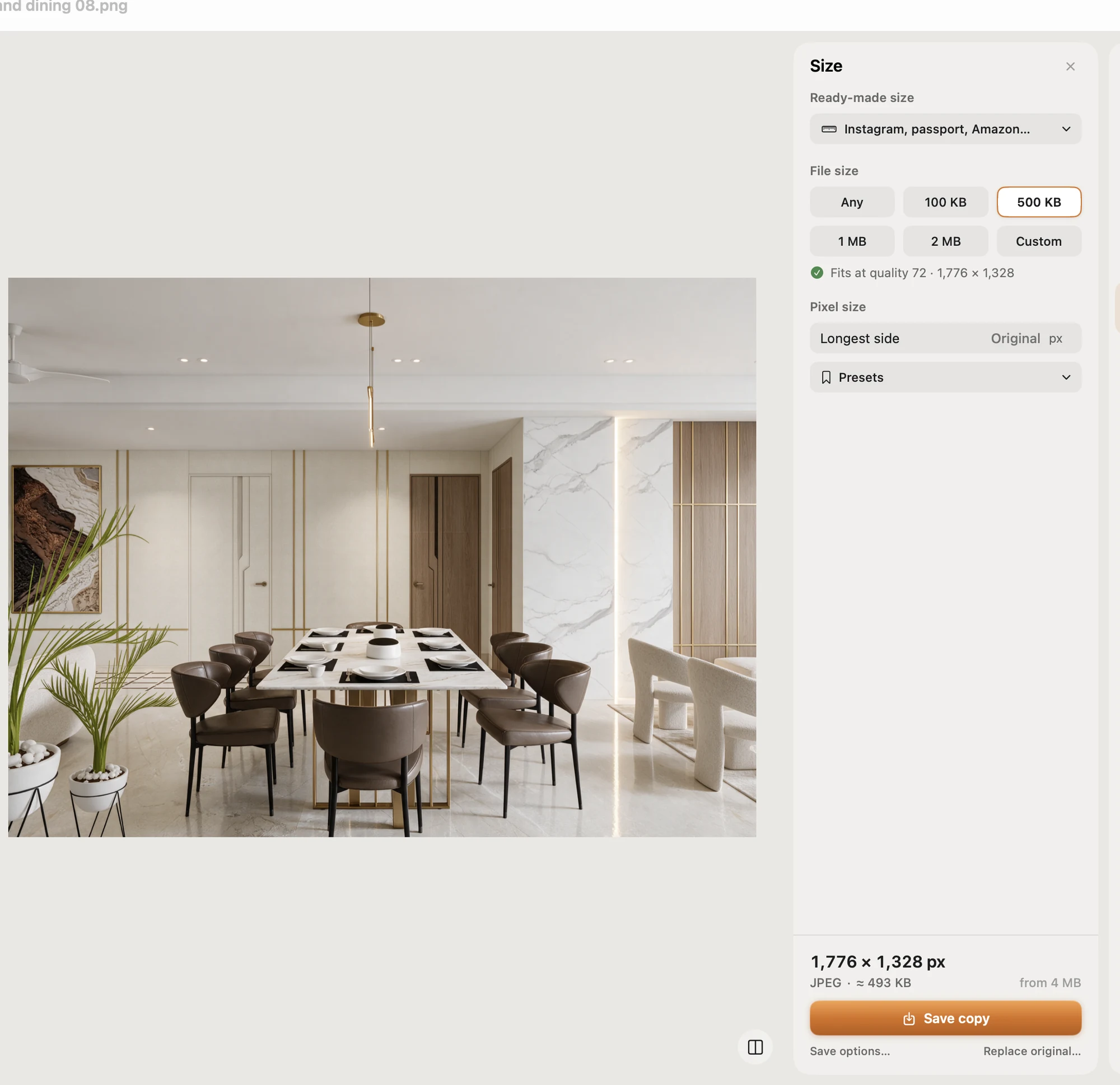
- Batch resize a whole folder in one Save. Originals are never changed; copies go to a Pictailor folder beside them.
- Compress to an exact file size (for example under 500 KB, 100 KB or 20 KB), checked on the real saved file. It never enlarges a photo.
- Right-click photos in the Finder (Services) to resize without opening the app.
- Works with JPEG, PNG, HEIC, TIFF, PDF, ICO, ICNS and GIF, on Apple Silicon and Intel Macs.
Pictailor is $5 direct from vistaar.studio (₹499 in India), with a licence for 1 Mac, or $4.99 on the Mac App Store. It needs macOS 15 or later. Meet Pictailor →
FAQ
What is the maximum attachment size for Gmail?
25 MB for personal accounts. Bigger attachments are removed and added as a Google Drive link. Work and school limits are set by the Workspace administrator.
What is the attachment size limit in Outlook?
Outlook.com: 25 MB for attached files, 2 GB for OneDrive files. Microsoft 365 work accounts default to a 35 MB message to send and 36 MB to receive; an administrator can set 1 MB to 150 MB.
Why does my email bounce when the attachment is under 25 MB?
Encoding makes attachments about a third larger (Microsoft's documentation describes a 33% increase), so 19 MB of files can become roughly 25 MB of message. The recipient's server may also allow less than yours.
How long does a Mail Drop link last?
30 days. Mail Drop sends up to 5 GB, doesn't count against your iCloud storage, and has a 1 TB storage limit.
How do I send a file bigger than 25 MB by email?
Send a link: Gmail uses Google Drive automatically, Outlook.com shares from OneDrive (up to 2 GB), and Apple Mail uses Mail Drop (up to 5 GB, 30 days). For photos, shrinking them first is usually enough.
How do I make photos small enough to email on a Mac?
In Mail, pick a smaller size from the image size pop-up menu on the right of the message header. In Preview, use Tools › Adjust Size. In Terminal, on copies: sips -Z 1600 -s format jpeg -s formatOptions 70 *.jpg