Guides › Photos
Social media image sizes 2026: the official numbers
Updated 2 November 2026 · by Vistaar Studio
Short answer: for feed posts, make images 1080 px wide: 1080 × 1350 (4:5) works on Instagram, Facebook and LinkedIn. Stories are 1080 × 1920 (9:16). Covers differ everywhere: Facebook 851 × 315, LinkedIn profile 1584 × 396, X 1500 × 500, YouTube 2560 × 1440. Pinterest wants 1000 × 1500 (2:3) and YouTube thumbnails are 16:9.
Size tables online copy each other and drift. So for every row we read the platform's own help, creator or business page and wrote down only what it says, with a link. Where a platform publishes no number, the cell says "no official size published". Last checked 2 November 2026. Platforms change these pages, so check the source before a big campaign.
The table
| Platform · format | Pixels | Aspect ratio | File size / format | Source |
|---|---|---|---|---|
| Instagram feed, square | 1080 × 1080 | 1:1 | Not stated | Instagram Help |
| Instagram feed, portrait | 1080 × 1350 (4:5) or 1080 × 1440 (3:4, the tallest kept) | 4:5 to 3:4 | Not stated | Instagram Help · Meta feed ads |
| Instagram feed, landscape | 1080 × 566 | 1.91:1 (widest kept) | Not stated | Instagram Help |
| Instagram story | 1080 × 1920 (600 × 1067 minimum) | 9:16 | JPG or PNG, up to 30 MB | Meta Stories ads · Stories specs |
| Instagram reel cover | 420 × 654 (reel itself: at least 720 px) | 1:1.55 (reel: 1.91:1 to 9:16) | Not stated | Instagram Help |
| Instagram profile picture | No official size published | Not on Instagram Help | ||
| Facebook feed post | No official size for ordinary posts. For ads, Meta asks at least 1440 × 1800 (4:5) or 1080 × 1080 (1:1) | 4:5 recommended (ads); 1.91:1 to 4:5 supported | Not stated | Meta ratios · Meta minimums |
| Facebook Page cover | 851 × 315 loads fastest; at least 400 × 150 | Shown 16:9 on computers, 2.4:1 on phones | sRGB JPG under 100 KB; PNG for logos or text | Facebook Help |
| Facebook Page profile picture | 320 × 320 (shows at 176 × 176 on computers, 196 × 196 on phones) | 1:1, cropped to a circle | PNG suggested for logos or text | Facebook Help |
| LinkedIn post photo | 1080 wide recommended; at least 552 × 276 | 3:1 to 4:5 | 5 MB per upload; up to 20 photos | LinkedIn Help |
| LinkedIn Page post with a link | 1200 × 627 | 1.91:1 | Not stated | LinkedIn Help |
| LinkedIn personal background (banner) | 1584 × 396 | 4:1 | JPG or PNG, under 8 MB | LinkedIn Help |
| LinkedIn company Page cover | 1512 × 256 (minimum and recommended) | About 5.9:1 | PNG or JPEG, max 3 MB | LinkedIn Help |
| LinkedIn profile photo / company logo | Profile: 400 × 400 up to 7680 × 4320. Logo: 400 × 400 (268 × 268 minimum) | 1:1 | Profile: PNG or JPG, 8 MB, no GIFs. Logo: 3 MB | Profile photo · Pages |
| X post image | No official size published | 2:1 to 3:4 shows in full (single photo) | Not stated | X Help |
| X header (banner) | 1500 × 500 | 3:1; up to 60 px may be cropped top and bottom | JPG, GIF or PNG (not animated) | X Help |
| X profile photo | 400 × 400 | 1:1 | JPEG, GIF or PNG, max 2 MB | X Help |
| Pinterest standard Pin | 1000 × 1500 | 2:3 | BMP, JPEG, PNG, TIFF or WebP; 20 MB on the web | Pinterest Create · Pin specs |
| YouTube thumbnail | 3840 × 2160 listed; at least 640 wide | 16:9 (Shorts 9:16) | JPG or PNG; 2 MB from mobile, 50 MB from a computer | YouTube Help |
| YouTube channel banner | 2560 × 1440; at least 2048 × 1152; keep text inside 1235 × 338 | 16:9 | 6 MB or smaller | YouTube Help |
| YouTube profile picture | Shows at 98 × 98; no upload size stated | 1:1 | JPG, GIF, BMP or PNG (not animated), max 15 MB | YouTube Help |
| TikTok photo post | No size in the Help Centre. Posting tools (developer API): up to 1080p | Not stated | API: JPEG or WebP, 20 MB per image | TikTok for Developers |
| TikTok profile photo / video cover | Profile: at least 20 × 20. Cover: no official size published | Not stated | Not stated | TikTok Support |
| WhatsApp status | No official size published | WhatsApp Help | ||
What the table doesn't fit
Instagram's real rule is width and shape. Its help page says photos are uploaded at up to 1,080 px wide. Anything wider is sized down, anything under 320 px is enlarged, and anything outside the 1.91:1 to 3:4 range is cropped. So a 3000 px photo isn't "better"; Instagram shrinks it anyway. For the full Instagram walkthrough, see how to resize photos for Instagram on Mac.
Some rows come from ad pages. Meta publishes story sizes and Facebook feed ratios only in its Business Help Centre, written for ads. They're the closest official numbers, so we use them and say so.
Covers get cropped differently on phones and computers. Facebook shows the same cover at 16:9 on a computer and 2.4:1 on a phone, X may trim 60 px from the top and bottom of a header, and YouTube shows only the 1235 × 338 middle of a banner on some screens. Keep text and faces in the centre.
Profile pictures end up as circles on most of these platforms. Upload a square with the face in the middle.
How to resize to these sizes on a Mac for free
Always work on a copy (select the file in Finder and press ⌘ D). The order matters: crop to the shape first, then resize, or the picture gets stretched.
With Preview
- Open the photo in Preview. Choose Tools › Rectangular Selection and drag a box in the right shape. The size shows as you drag, so aim for the ratio you need (4:5, 9:16, 3:1…).
- Choose Tools › Crop (⌘ K).
- Choose Tools › Adjust Size, set the units to pixels, keep Scale proportionally ticked and type the width, for example 1080. Click OK and save.
For a square, how to make an image square on Mac has more ways, including padding instead of cropping.
With sips in Terminal
macOS includes a command called sips. It overwrites the file unless you add --out, so use copies. We tested these on macOS 26.2 with a 1920 × 1080 photo:
# 4:5 Instagram / Facebook / LinkedIn portrait (1080 × 1350)
sips -c 1080 864 photo.jpg
sips -z 1350 1080 photo.jpg

# 9:16 story (1080 × 1920)
sips -c 1080 608 story.jpg
sips -z 1920 1080 story.jpg

# square (1080 × 1080)
sips -c 1080 1080 square.jpg
sips -z 1080 1080 square.jpg
-c height width crops from the centre; -z height width resizes to exact pixels (--resampleHeightWidth is the long name). Note the order: height first. The crop numbers above suit a 1080 px tall photo; for other photos, work out the largest box of the right shape that fits.
To shrink a whole folder to 1080 px on the long side and save JPEG copies in another folder, leaving the originals alone:
mkdir resized
sips -s format jpeg -Z 1080 *.webp --out resized
macOS can read WebP but sips can't write it: ask for WebP and no file appears. Save as JPEG or PNG, which every platform above accepts. More options are in how to batch resize images on Mac.
Doing a folder at a time: Pictailor
We make this app, so weigh this part with that in mind. The free methods above work. Pictailor, our batch photo resizer for Mac, does the same jobs with buttons:
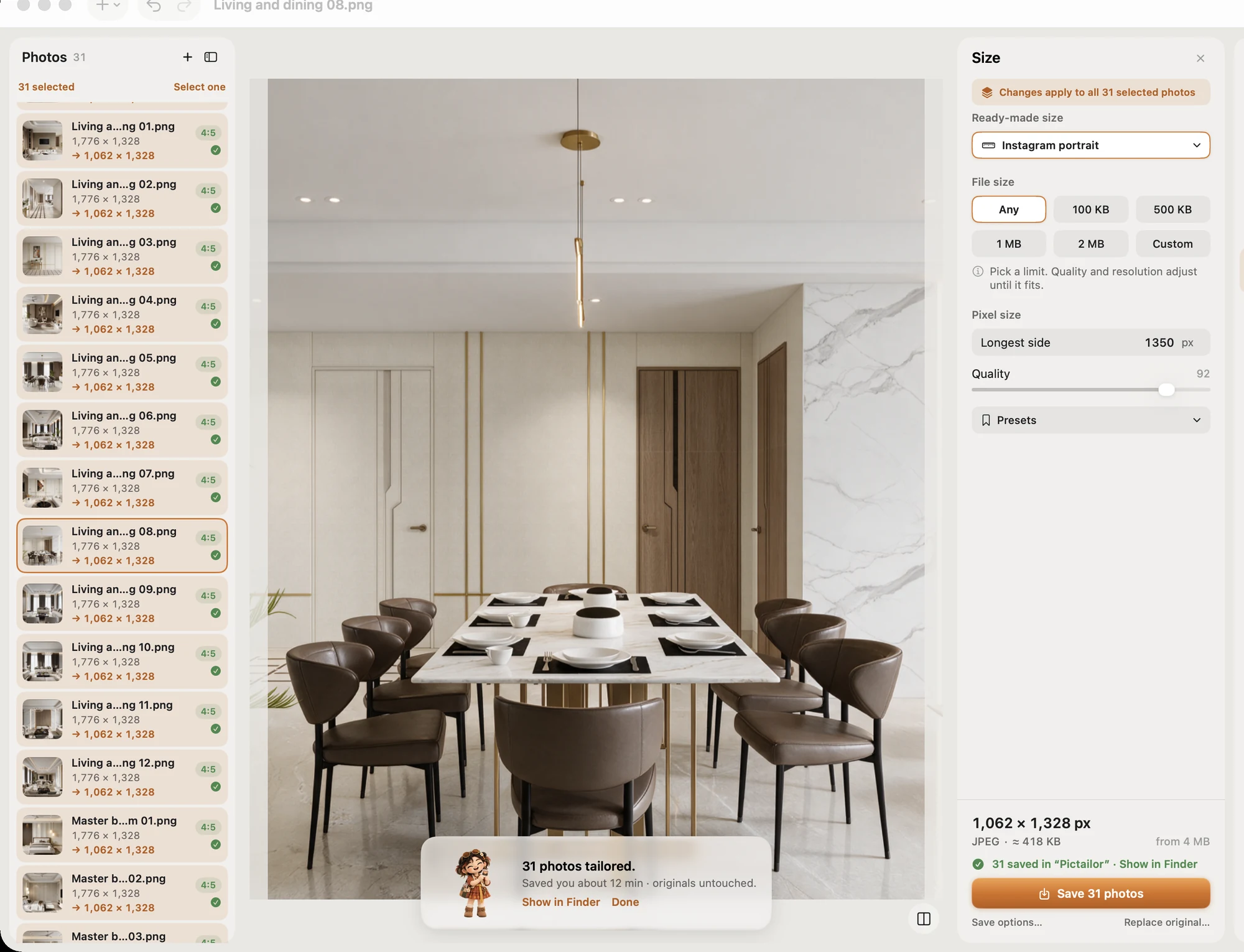
- Batch resize a whole folder in one Save. Originals are never changed; copies go to a Pictailor folder beside them.
- Ready-made sizes for social posts, online shops and more.
- Compress to an exact file size (handy for limits like Facebook's 100 KB cover), checked on the real saved file. It never enlarges a photo.
- Right-click photos in the Finder (Services) to resize without opening the app.
Pictailor is $5 direct from vistaar.studio (₹499 in India), with a licence for 1 Mac, or $4.99 on the Mac App Store. It needs macOS 15 or later. Meet Pictailor →
FAQ
What is the best image size for Instagram in 2026?
1080 px wide, between 1.91:1 and 3:4: 1080 × 1080, 1080 × 1350 or 1080 × 1440. Stories are 1080 × 1920.
Is there one image size that works on every platform?
For feeds, 1080 × 1350 (4:5) fits Instagram, Facebook and LinkedIn; 1080 × 1920 fits stories. Covers and banners all need their own shape.
What size is a YouTube thumbnail?
16:9, at least 640 px wide, JPG or PNG. YouTube lists 3840 × 2160 for videos. The limit is 2 MB from mobile, 50 MB from a computer.
Why does Instagram not publish a profile picture size?
We couldn't find one on any Instagram or Meta help page, and the numbers elsewhere aren't official. Use a clear square with the face centred.
How do I resize an image to 1080 × 1350 on a Mac for free?
Crop to 4:5, then resize. In Preview: Tools › Crop, then Tools › Adjust Size to 1080 wide. In Terminal, on a copy of a 1920 × 1080 photo: sips -c 1080 864 photo.jpg, then sips -z 1350 1080 photo.jpg.