Guides › Photos
Product image size requirements by marketplace (2026)
Updated 28 October 2026 · by Vistaar Studio
Short answer: a 2000 × 2000 px square JPEG, in sRGB, under 1 MB passes Amazon, Shopify and eBay and meets Etsy's recommended size. Amazon's main image must be on pure white (255, 255, 255) with the product filling about 85% of the frame. Etsy is the odd one out: it prefers a landscape first photo and needs at least one photo against a real background. Flipkart and Meesho show their exact numbers only inside the seller panel.
Every number below comes from the marketplace's own help pages, not from agency blogs. That matters: copy-pasted "requirements" posts disagree with each other and with the source, and a rejected listing costs you a day. Where a marketplace doesn't publish a number, we say so rather than guess. We checked the pages on 28 October 2026; marketplaces change these, so the links are in the notes at the end.
The comparison table
| Marketplace | Minimum | Recommended | Maximum | Formats | Main-photo background | Photos per listing |
|---|---|---|---|---|---|---|
| Amazon (US) | 500 px longest side | 1,000 px+ (for zoom) | 10,000 px | JPEG (preferred), TIFF, PNG, non-animated GIF | Pure white 255, 255, 255; product ~85% of frame | Main + additional images |
| Etsy | 635 × 635 px (first photo) | 2000 px+ both sides | No hard limit; over 1 MB may fail to upload | JPG, PNG, GIF, SVG, HEIC (no animated GIF, no transparency) | No white rule; one unedited photo on a real background required | Up to 20 + 2 videos |
| Shopify | Not stated | 2048 × 2048 px (square) | 5000 × 5000 px / 25 MP, 20 MB | PNG, JPEG best; also WebP, HEIC, GIF, TIFF, BMP, SVG | No rule | Up to 250 media |
| eBay | 500 px longest side | About 1600 × 1600 px | 12 MB per file | JPEG, PNG, GIF, TIFF, BMP, WebP, HEIC, AVIF | White recommended, not required | 1 to 24 |
| Flipkart | Not published publicly; shown in Seller Hub when listing | See Seller Hub | White background advised in Flipkart's seller blog | See Seller Hub | ||
| Meesho | Not published publicly; shown in the Supplier Panel | See Supplier Panel | No logos, watermarks or props on public category pages | See Supplier Panel | ||
What each marketplace actually cares about
Amazon
Amazon is the strictest about the main image: pure white background, the whole product shown once, filling about 85% of the frame, with no text, logos, badges, watermarks or props that aren't included. Some categories add rules (a single shoe facing left at 45°, for example). Other image slots are more relaxed. We cover the full checklist, and how to check "pure white" with Digital Color Meter on a Mac, in Amazon product photo on Mac: pure white background and the right size.
Etsy
Etsy cares more about honesty than white backgrounds. Each listing needs at least one unedited photo of the actual item against a real background (there are exceptions for some item types). Etsy's guide asks for a landscape or square first photo, though the same page also says to avoid square crops, so landscape is the safer choice. The first photo sets the shape of the rest. Leave space around the product, because Etsy crops thumbnails to square, portrait and landscape. Convert to sRGB; CMYK files look wrong. Transparent PNGs show black where they're transparent.
Shopify
Shopify is relaxed about content, since it's your own shop, but it has firm technical limits: up to 5000 × 5000 px (25 megapixels) and 20 MB per image. It recommends 2048 × 2048 for square product photos and suggests keeping one aspect ratio across products so collection pages line up. One odd catch: don't end file names with words like small, large, thumb or icon, because Shopify's image server treats them as resize requests.
eBay
eBay's photo policy is about honesty: no added borders, text, artwork or watermarks of any kind, no placeholder images, and no stock photos for used or damaged items. Its help pages recommend about 1600 px on the longest side, a 1:1 or 16:9 shape, and a neutral, usually white background, with darker ones suiting shiny items.
Flipkart and Meesho
India's two big marketplaces keep their exact pixel and file-size rules inside the seller dashboards (Flipkart Seller Hub, Meesho Supplier Panel), and their public pages don't list them. You'll find confident numbers on other websites, but they disagree with each other, so trust what the panel shows when you upload. What their public pages do say is consistent with everyone else: a clear photo of the whole product, white or plain background for the main image, and no logos, watermarks or props. A white 2000 px square, made the way below, is a sensible starting point.
Make one set of photos that works everywhere (on a Mac)
The trick is to keep one master photo per product and export the sizes from it, rather than editing each marketplace's copy by hand.
- Shoot or cut out on white. If the background is grey or messy, remove it first; our guide on removing a background on Mac covers the free built-in ways.
- Make it a 2000 px white square. In Terminal, on a copy of the photo (sips overwrites the file):
The first line fits the product inside 1700 px; the second pads it to a 2000 × 2000 white square, centred, which leaves the product filling roughly 85% of the frame. Usesips -Z 1700 product.jpg sips -p 2000 2000 --padColor FFFFFF product.jpg*.jpginstead of a file name to do a whole folder. More ways, including Photos and Preview, are in how to make an image square on Mac. - Convert to sRGB. iPhone and Mac photos are often Display P3. Etsy asks for sRGB, and it's the safe choice everywhere:
We tested both commands on macOS 26.2.sips --matchTo "/System/Library/ColorSync/Profiles/sRGB Profile.icc" product.jpg - Keep it under 1 MB. A 2000 px JPEG is usually a few hundred KB. If it isn't, open it in Preview, choose File › Export and lower the Quality slider, or see how to resize a photo to an exact KB size on Mac.
- For Etsy, add a landscape lifestyle shot of the real item in a real setting as the first photo, and keep the white square as a later one.
Check the result before you upload: select it in the Finder and press ⌘ I for the size in pixels and KB, and use Digital Color Meter on a corner to confirm the white reads 255, 255, 255.
Do it for a whole folder: Pictailor
We make this app, so read this part with that in mind. The Terminal commands above are free and work well. Pictailor, our batch photo resizer for Mac, is for people who'd rather do the same thing with buttons, on a folder at a time.
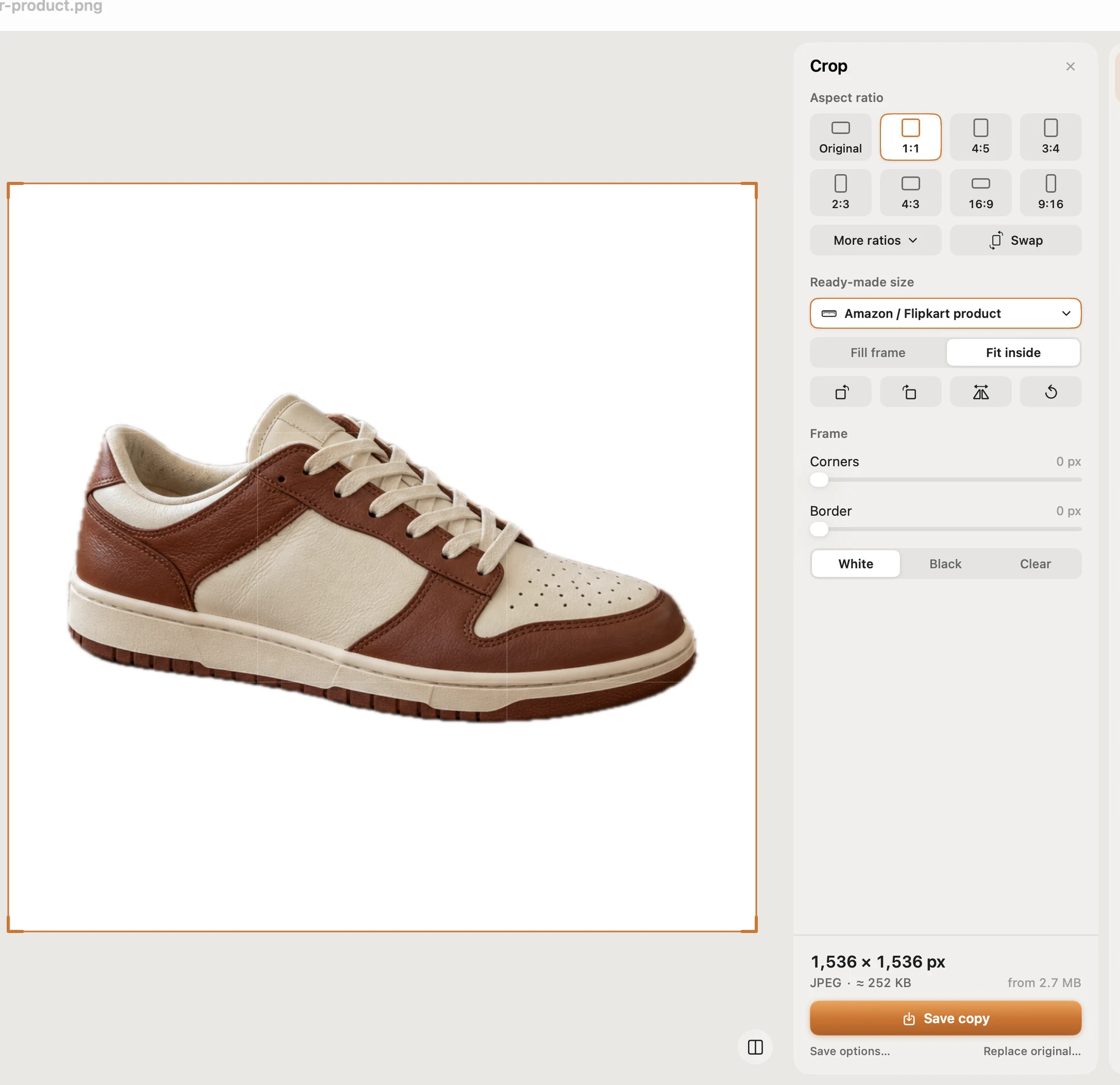
- Ready-made sizes for online shops, including an Amazon / Flipkart product white square, plus social posts, passport and ID photos and exam photos.
- Compress to an exact file size (under 1 MB, 500 KB, 100 KB…), checked on the real saved file. It never enlarges a photo.
- Remove the background on your Mac (a one-time model download) and erase small objects.
- Batch a whole folder in one Save. Originals are never changed; copies go to a Pictailor folder beside them. You can also right-click photos in the Finder to resize without opening the app.
Pictailor is available now from vistaar.studio for $5 (₹499 in India), paid up front, with a licence key for 1 Mac. It's also on the Mac App Store for $4.99. It runs on Apple Silicon and Intel Macs with macOS 15 or later. Meet Pictailor →
FAQ
What is the best product image size for all marketplaces?
A 2000 × 2000 px square JPEG in sRGB, under 1 MB, on pure white for Amazon's main image. Add a landscape real-background shot for Etsy.
Does every marketplace require a white background?
No. Amazon requires pure white for the main image, eBay recommends it, Shopify has no rule, and Etsy needs at least one photo on a real background.
What is the minimum image size on Etsy, eBay and Amazon?
Etsy 635 × 635 px for the first photo (2000+ recommended); eBay 500 px longest side (about 1600 recommended); Amazon 500 px longest side (1,000+ recommended).
What is the maximum file size for product photos?
Shopify 20 MB and 5000 × 5000 px; eBay 12 MB; Etsy has no hard limit but files over 1 MB may not finish uploading. Under 1 MB is safe everywhere.
Where are Flipkart's and Meesho's image size rules?
Inside Flipkart Seller Hub and the Meesho Supplier Panel. Their public pages don't list exact numbers, and numbers on other sites vary.
How do I resize product photos to a white square on a Mac?
On a copy: sips -Z 1700 photo.jpg, then sips -p 2000 2000 --padColor FFFFFF photo.jpg. Use *.jpg for a folder.