Guides › Photos
How to convert WebP to JPG on Mac
Updated 27 October 2026 · by Vistaar Studio
Short answer: double-click the .webp file so it opens in Preview, choose File › Export, set Format to JPEG, and click Save. You get a JPG copy and the WebP is left alone. For a whole folder, one Terminal line does it: sips -s format jpeg *.webp --out jpg/. Everything here is free and already on your Mac.
WebP is the format many websites now serve images in, because it's smaller than JPEG. The trouble starts when you save one: a form says "JPG or PNG only", an older app won't open it, or a client asks for "normal" photos. Your Mac can read WebP fine; it just can't write it. Below are the built-in ways to convert, the numbers from our own tests, and the few traps to know about.
1. Preview: one image, with a quality slider
- Double-click the WebP. If it opens in a browser instead, Control-click it and choose Open With › Preview.
- Choose File › Export.
- Set Format to JPEG. Drag Quality to taste; the estimated file size shows underneath, which helps when a form has a KB limit.
- Choose where to save and click Save. Export makes a new file, so the original WebP is untouched.
You won't see WebP in Preview's Format list when going the other way. That's not a setting you've missed; see "Why your Mac can't save WebP" below.
2. Preview: several images at once
- Select all the WebP files in the Finder and press ⌘ O. If they open in a browser, Control-click › Open With › Preview instead.
- Show the sidebar with View › Thumbnails, click any thumbnail and press ⌘ A.
- Choose File › Export Selected Images, click Options, set Format to JPEG and the quality.
- Pick a folder (a new empty one keeps things tidy) and click Choose.
3. Terminal: a whole folder in seconds
For dozens or hundreds of files, the built-in sips command is the quickest. Open Terminal, type cd (with a space), drag the folder onto the window, press Return, then run:
mkdir jpg
sips -s format jpeg -s formatOptions 85 *.webp --out jpg/
Every WebP gets a JPG copy in a new jpg folder at quality 85 (any number from 1 to 100 works, or leave out -s formatOptions 85 for the default). sips renames the copies to .jpg itself. The pattern is case-sensitive, so run it again with *.WEBP if some names are in capitals. Need PNG instead? Swap jpeg for png.
4. Finder Quick Action: Convert Image
In macOS Monterey and later, Control-click an image in the Finder and choose Quick Actions › Convert Image, then set Format to JPEG and click Convert to JPEG. It's the same route we describe in our PNG to JPG guide. We didn't test it on WebP files today, so if Convert Image doesn't show up for yours, use Preview or sips; both read WebP fine.
What we found when we tested it
We ran sips on macOS Tahoe 26.2 with WebP images from this website.
| Test | WebP | JPG result |
|---|---|---|
| Photo-style scene, 1920 × 1080 | 154 KB | 413 KB at q92 · 320 KB at q80 · 218 KB at q60 |
| Folder of 8 scenes, 1920 × 1080 each | 1.1 MB total | 2.3 MB total at default quality, all 8 converted |
| Character art with a transparent background, 857 × 847 | 177 KB | 199 KB; the see-through corner became pure white (255, 255, 255) |
| Saving a JPG as WebP | Failed: "Can't write format: org.webmproject.webp" | |
Two things stand out. First, the JPG is usually bigger, often about double, because WebP squeezes images harder than JPEG at similar quality. That's normal, not a mistake. If you hit a size limit, lower the quality or the pixel dimensions; our guide to getting a photo under 50 KB on Mac walks through both. Second, transparency is lost: logos and cut-outs get a white background. If you need it see-through, convert to PNG.
Why your Mac can't save WebP
macOS has opened WebP images since Big Sur, but its image engine (the one Preview, the Finder and sips all use) only reads them. On macOS 26.2, sips --formats lists webp without the "Writable" label that JPEG, PNG and HEIC have. So converting to JPG is easy, but converting a JPG to WebP needs another tool.
If you do need WebP, for your own website for example, Google publishes a free command-line encoder called cwebp as part of libwebp. Its basic use is cwebp -q 80 photo.jpg -o photo.webp. Install it only from Google's download page or a package manager you already trust.
Saving WebP images from websites as JPG
When you right-click a web image and choose Save Image As, you get whatever format the site served, which is often WebP even when the address ends in .jpg. Rather than saving and converting, you can skip a step:
- In Safari, Control-click the image and choose Copy Image.
- In Preview, choose File › New from Clipboard.
- Choose File › Export, set Format to JPEG and save.
Please only do this with images you're allowed to use: your own, your company's, or ones with a licence that permits it.
Common problems
- "I renamed it to .jpg and the upload still fails." Renaming doesn't change the data inside. The site sees a WebP and rejects it. Convert it with one of the methods above.
- Double-clicking opens Chrome or Safari. Your browser has claimed WebP files. Use Open With › Preview, or select a WebP, press ⌘ I, set Open with to Preview and click Change All.
- The WebP is animated. Converting to JPG keeps a single frame. For moving images you'd need GIF or video, which is outside this guide.
- The JPG looks blotchy around text. JPEG dislikes sharp edges. Export at quality 90 or above, or use PNG for screenshots and graphics.
- The file is now too big for the form. Expected, as above. Lower the quality in Preview's Export window, or shrink the pixels with Tools › Adjust Size first.
Convert, resize and hit a size limit: Pictailor
We make this app, so read this part with that in mind. For a plain WebP-to-JPG swap, Preview or sips is all you need. Pictailor helps with the next step, when the converted photos also have to fit a pixel size or a KB limit, and you'd rather not do the maths file by file.
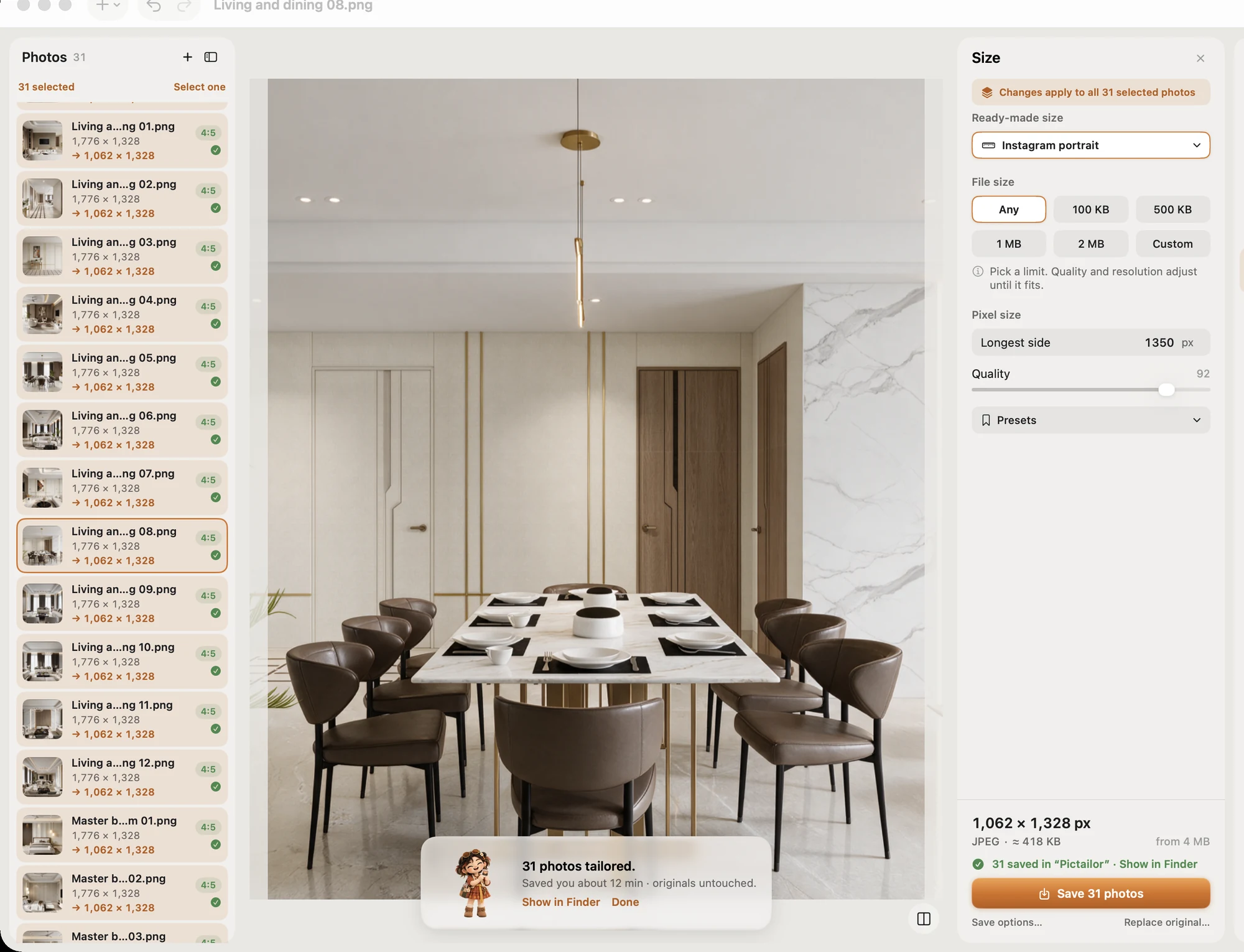
- Saves JPEG, PNG, HEIC, TIFF, PDF, ICO, ICNS and GIF. (Like macOS itself, it doesn't save WebP.)
- Batch resize a whole folder in one Save. Originals are never changed: copies go to a Pictailor folder beside them.
- Compress to an exact file size (under 500 KB, 100 KB, 20 KB…), checked on the real saved file. It never enlarges a photo.
- Ready-made sizes for social posts, online shops, passport and ID photos for many countries, exam photos and signatures.
Pictailor is available now from vistaar.studio for $5 (₹499 in India), paid up front, with a licence key for 1 Mac. It's also on the Mac App Store for $4.99. It runs on Apple Silicon and Intel Macs with macOS 15 or later. Meet Pictailor →
FAQ
How do I convert a WebP image to JPG on a Mac?
Open it in Preview, choose File › Export, set Format to JPEG and click Save. The WebP stays as it was.
How do I convert a whole folder of WebP files to JPG?
Use Preview's Export Selected Images, or in Terminal inside the folder: mkdir jpg; sips -s format jpeg *.webp --out jpg/.
Why can't I save an image as WebP on my Mac?
macOS reads WebP but can't write it; sips on 26.2 fails with "Can't write format". Use Google's free cwebp if you need WebP files.
Why is my JPG bigger than the WebP?
WebP compresses harder. Our 154 KB WebP became a 320 KB JPG at quality 80. Lower the quality or the pixel size if that's a problem.
What happens to a transparent WebP?
The see-through area is filled; in our test it became pure white. Convert to PNG to keep transparency.
Can I save a WebP from a website straight as JPG?
Not with Save Image As. Copy the image in Safari, then in Preview use File › New from Clipboard and export as JPEG.