Guides › Mac clipboard
The best free clipboard manager for Mac in 2026
Updated 22 November 2026 · by Vistaar Studio
Short answer: on macOS Tahoe 26 or later, start with the clipboard history built into Spotlight (⌘ Space, then ⌘ 4). If you want an app, Maccy is the best free pick: open source, tiny, and it can keep text, images and files. Clipy is the free alternative if you also want saved snippets, and Raycast's free plan covers you if you already use it as a launcher.
A disclosure first: we make a clipboard manager, Desk Buddy, and it is not free. It has a short, labelled section near the end. This page covers only what you can get for $0; for paid apps too, see our roundup of the best clipboard managers for Mac. Every fact below was read on the app's own website, GitHub page or Mac App Store listing on 22 November 2026.
What "free" really means
- Built in. Spotlight's clipboard history is part of macOS.
- Free and open source. Maccy, Clipy and Flycut publish their code under the MIT licence. Every feature is free, and anyone can read the code.
- Free, but closed source. CopyClip costs nothing on the Mac App Store, but its code isn't public. Its developer also sells a separate paid app, CopyClip 2.
- A free tier. Raycast is free to use, with limits. The paid plan raises them.
A fifth kind looks free and isn't: the free trial. Paste, for example, was a free download with a 7-day trial and then a subscription when we compared Paste and Maccy in October. Check the in-app purchase line on a store page before you install.
At a glance
| What's free | Open source | Keeps images | Needs | Last update | |
|---|---|---|---|---|---|
| Spotlight (built in) | Everything; part of macOS | No | Yes, and copied files | macOS 26+ | With macOS |
| Maccy | Everything (direct download or Homebrew); $9.99 on the App Store | Yes, MIT | Yes, and files | macOS 14+ | 2.8.0, 26 Oct 2026 |
| Clipy | Everything; donations optional | Yes, MIT | Yes | macOS 13+ | 1.4.2, 15 Nov 2026 |
| Raycast (free plan) | 3 months of history; unlimited and sync need Pro | No | Yes | macOS Tahoe, Apple silicon | Not checked |
| CopyClip | Everything (Mac App Store) | No | Not stated | macOS 12+ | 1.9.88, 4 Nov 2026 |
| Flycut | Everything | Yes, MIT | Not stated | macOS 10.10+ | 1.9.6, 22 Dec 2020 |
"Not stated" means the official page doesn't say, not that the answer is no. "Last update" is the newest public release we could see on 22 November 2026.
1. Spotlight: free and already on your Mac
Since macOS Tahoe 26, Spotlight remembers what you copy, and Apple's help page lists the same feature for macOS 27. Press ⌘ Space, then ⌘ 4, to search your recent copies. It keeps text, images and copied Finder files. Text comes back plain, with its formatting stripped. Copies from Apple's Passwords app are left out.
The catch is time. History lasts 8 hours by default. From macOS 26.1 you can choose 30 minutes, 8 hours or 7 days in System Settings › Spotlight, and that's the ceiling. There's no pinning either. Our guide to seeing clipboard history on Mac walks through the settings.
Not for: anything you want to keep past a week, or Macs on macOS 15 and earlier.
2. Maccy: the best free app
Maccy is a small menu-bar app. Press ⇧ ⌘ C, type a few letters to filter, press Return. You can pin items with ⌥ P, and its storage settings let you choose whether it saves text, images and files. It keeps 200 items unless you raise the number. Everything stays on your Mac, and copies that password managers mark as concealed are ignored.
What free means here: the whole app. Maccy is open source under the MIT licence, and its website says "It is and will always be free." Download it from the project's GitHub releases page or run brew install maccy. The Mac App Store version costs $9.99 and is sold to support development. The project warns that maccy.app is its only official website.
It needs macOS Sonoma 14 or later. The latest release, 2.8.0, came out on 26 October 2026. There's no sync between Macs.
3. Clipy: free and open source, with snippets
Clipy is the closest free alternative to Maccy. It keeps plain text, images and other formats, and adds snippets, text you save once and paste whenever you need it. ⇧ ⌘ V opens its main menu.
What free means here: the whole app again. Clipy's site says it "offers all of its features for free" with no plans to charge, and the code is MIT-licensed. Donations are optional. Download it from clipy-app.com.
It's actively maintained: version 1.4.2 came out on 15 November 2026. The release notes call it the last version to support macOS 13 Ventura, so later versions will need macOS 14.
One thing to know: Clipy's privacy policy says usage analytics and crash reporting (through Firebase) are on by default and can be switched off in its Preferences. It says clipboard contents are never sent, and that stored history isn't encrypted.
4. Raycast: a free tier that's generous enough
Raycast is a launcher that replaces Spotlight, and clipboard history is one of its built-in features. The free plan keeps three months of text, images, colours and links. Raycast says copied content is encrypted on your disk and passwords from password managers are ignored by default.
What free means here: a free tier, not a free app with everything. Unlimited history and Cloud Sync belong to Raycast Pro, at $10 a month or $96 a year. Its website currently lists macOS Tahoe and Apple silicon as requirements.
It suits people who already use Raycast. It's a lot of app to learn for one feature.
5. CopyClip: free and simple
CopyClip from FIPLAB is a free menu-bar app on the Mac App Store. Its listing describes a plain list of what you've copied or cut, for finding "that snippet of text" again, and doesn't mention images. It runs on macOS 12 or later, which helps on older Macs, and it was last updated on 4 November 2026 (version 1.9.88). It isn't open source.
6. Flycut: free, but showing its age
Flycut is an MIT-licensed clipboard manager "for developers", based on the older Jumpcut, and free on the Mac App Store. Paste from its history with ⇧ ⌘ V. It looks unmaintained: the newest release, 1.9.6, is from December 2020. Its GitHub repository got a few fixes in August 2026, but no new version has shipped. It runs on macOS 10.10 and later, so it may suit a very old Mac.
When free is enough, and when paying makes sense
Free is enough if you work on one Mac, mostly copy text, links and the odd screenshot, and want yesterday's copy back without fuss. Spotlight or Maccy covers that, including copying several things and pasting them one by one.
Paying starts to make sense if you want one of these:
- Sync. None of the free options above keeps one history across two Macs without a paid plan. See how to sync the clipboard between two Macs.
- Organisation. Boards or folders for the things you paste every week, beyond a single pinned list.
- Extras such as grabbing text from the screen straight into your history.
Try a free app for a week first. If you never miss anything, you're done.
Our app: Desk Buddy (not free)
We make this one, so weigh our words accordingly. Desk Buddy is a paid clipboard manager for Mac with a little friend, Buddy, who sits at the edge of your screen. It doesn't belong in a list of free apps, so this is just what it does and costs.
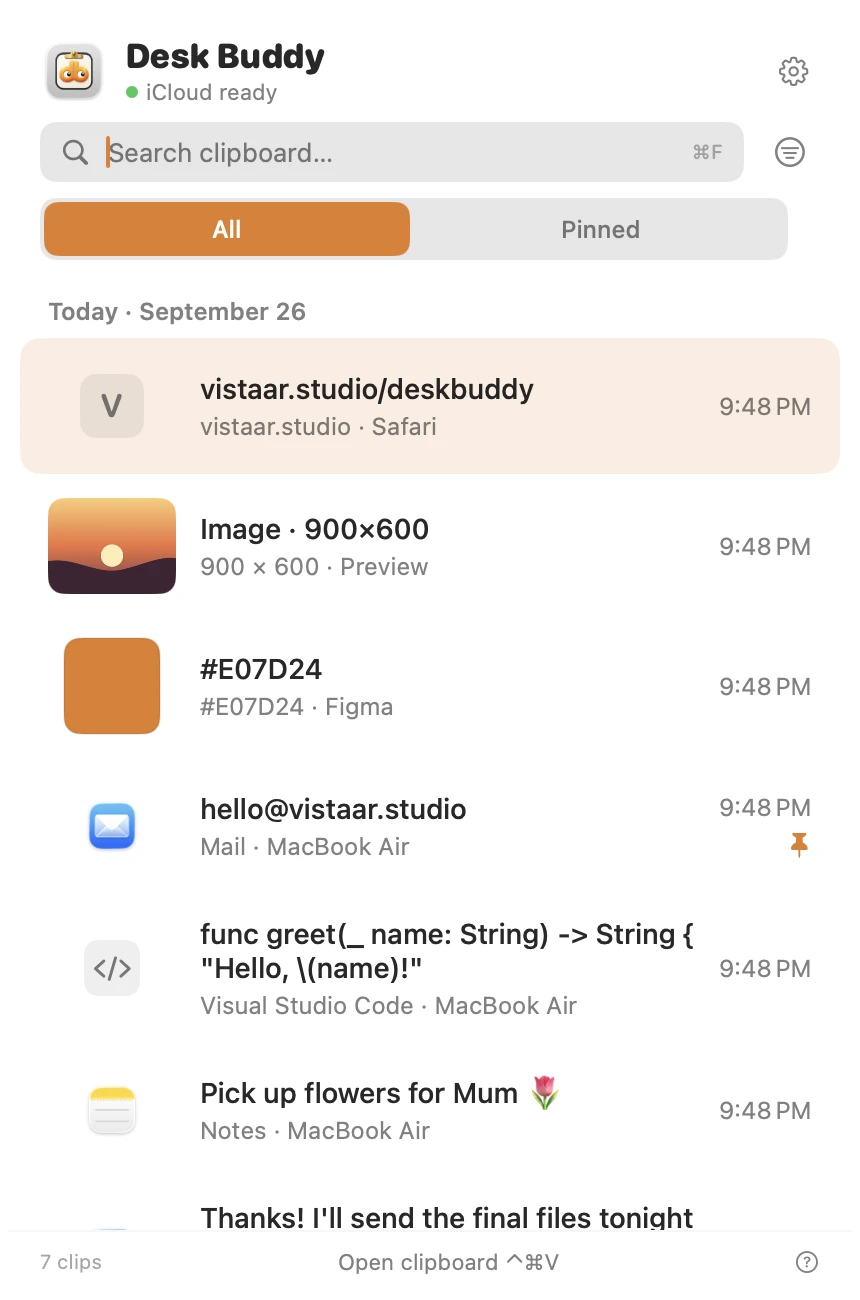
- Keeps text, links, images, colours, code and files, with search, pinning and boards.
- ⌃ ⌘ V (or the menu-bar icon, or clicking Buddy) opens your history; click a copy to paste it.
- Shows which website or app each copy came from, with the site's icon.
- Optional sync between your Macs through your own iCloud.
- Password managers are left out of history, and copies other apps mark as private are never saved.
- Copy Text from Screen (in Desk Buddy Complete): press ⌃ ⌘ 2 and drag a box over anything on screen. Recognition runs on your Mac with Apple's Vision framework, and it reads QR codes and barcodes too.
Desk Buddy is available now from vistaar.studio as Desk Buddy Complete: $5 for 1 Mac, $8 for 2 or $10 for 3, paid up front, with no trial on the direct version. A Mac App Store edition is coming soon: a free download with a 7-day free trial, then $9.99. It needs macOS 14 or later. Meet Desk Buddy →
FAQ
What is the best free clipboard manager for Mac?
Maccy for most people: free, open source (MIT licence), and it can keep text, images and files. On macOS Tahoe 26 or later, try the clipboard history built into Spotlight first, since there is nothing to install.
Is Maccy really free?
Yes. Maccy is free from its GitHub releases page or with brew install maccy, and its website says it will always be free. The Mac App Store version costs $9.99 and is sold to support development.
What are the free alternatives to Maccy?
Clipy is the closest: free, open source (MIT) and actively updated, with snippets as well as history. Raycast's free plan includes clipboard history, CopyClip is a free menu-bar app on the Mac App Store, and Spotlight has a basic history built in.
Does the Mac have a free built-in clipboard history?
Yes, on macOS Tahoe 26 and later. Press Command-Space to open Spotlight, then Command-4. It keeps copies for 8 hours by default, or 30 minutes or 7 days if you change the setting in macOS 26.1 or later.
Are free clipboard managers safe?
Any clipboard manager sees everything you copy, paid or free. Download only from the official site, GitHub page or the Mac App Store, check how it treats password managers, and prefer apps whose code is public or that are still being updated.