Guides › Clipboard on Mac
Copy and paste not working on Mac? 8 fixes that work
Updated 19 October 2026 · by Vistaar Studio
Short answer: the Mac clipboard is run by a small background process called pboard, and when it gets stuck, copy-paste quietly stops everywhere. Open Activity Monitor, search for pboard, select it, click the Stop (X) button and choose Force Quit. macOS restarts it instantly, and copy-paste usually works again. If it doesn't, work through the checks below.
First, a quick test to see what kind of problem you have. Open TextEdit, type a word, select it and press ⌘ C then ⌘ V. If it fails there too, the problem is system-wide: start with fix 1. If TextEdit works but one app or website doesn't, skip to fixes 5–7.
1. Restart the clipboard (pboard) in Activity Monitor
- Open Activity Monitor (press ⌘ Space, type "Activity Monitor", press Return).
- Type pboard in the search box at the top right.
- Select the pboard row and click the Stop button (the X in the toolbar).
- Choose Force Quit.
pboard disappears from the list and a fresh one starts the next time anything copies. Try copy-paste again. One warning: whatever was on the clipboard at that moment is gone, so if you're mid-way through moving something important, paste it somewhere safe first if you can.
2. Or do it from Terminal
Open Terminal and run:
killall pboardMany guides tell you to use sudo killall pboard and type your password. You don't need to: pboard runs under your own account as a standard macOS background agent, and macOS relaunches it on its own. (sudo does no harm, it just isn't necessary.)
3. Restart the Mac
Boring, but it resets pboard, the keyboard handling and every app at once. If copy-paste works after a restart and breaks again later, something you use regularly is interfering, and fixes 4 and 5 will help you find it.
4. Check your keyboard shortcuts
If copying works from the Edit menu but not with ⌘ C / ⌘ V, something has taken over the shortcut.
- Open System Settings › Keyboard, click Keyboard Shortcuts… and look under App Shortcuts for anything assigned to ⌘C, ⌘V or ⌘X. Remove it with the minus button.
- Keyboard remappers and automation tools (Karabiner-Elements, BetterTouchTool, Keyboard Maestro and similar) can intercept these keys. Quit them and test again.
- Try a different keyboard, or the built-in one on a MacBook. A sticky or failing ⌘ key looks exactly like a clipboard problem.
5. Quit clipboard and "helper" apps one by one
Clipboard managers, screenshot tools, translation pop-ups, password managers and remote-desktop apps all watch or touch the clipboard. Usually they get along fine, but a crashed or outdated one can get in the way. Quit them from the menu bar one at a time, testing in TextEdit after each, until copy-paste comes back. Then update or reinstall the one that caused it. (That includes our own app, Desk Buddy: if it's ever the culprit, we'd like to hear about it at contact@vistaar.studio.)
6. The app or page is blocking copying
If Copy is greyed out in the Edit menu, the Mac is fine and the content is the problem.
- Websites sometimes block selecting or copying text. In Safari, try View › Show Reader; Reader view often lets you select the text normally.
- PDFs can be set to disallow copying. In Preview, Tools › Show Inspector shows the document's permissions under the lock (Encryption) tab. Scanned PDFs have no text to copy at all; our guide to copying text from a PDF on Mac covers both cases.
- For both, take a screenshot (⇧ ⌘ 4), open it, and use Live Text to select and copy the words from the image. Our guide to copying text from an image on Mac walks through it.
Please respect copyright and the reason a document was locked; this is for quoting and your own material, not lifting someone's work.
7. Terminal says "Paste blocked"
Since macOS 26.4, Terminal may stop a paste the first time you paste commands copied from Safari or another app, with a warning along the lines of "Possible malware, Paste blocked". This is deliberate: scam pages often tell people to paste commands into Terminal. If you know exactly where the command came from and trust it, the warning lets you paste anyway; if a website or "support agent" told you to paste it, cancel.
8. Pasting something you didn't copy (Universal Clipboard)
If your Mac pastes something you copied on your iPhone or another Mac, that's Universal Clipboard, part of Handoff. A recent copy on a nearby device signed in to the same Apple Account can replace what's on the Mac's clipboard. To rule it out, turn off Handoff in System Settings › General › AirDrop & Handoff. If Universal Clipboard is the thing that isn't working, see our guide to syncing the clipboard between Macs.
In a virtual machine or a remote-desktop session, copy-paste between the Mac and the other system depends on that app's own "shared clipboard" setting, so check there first.
Quick reference
| What you see | Most likely cause | Try |
|---|---|---|
| Copy-paste dead in every app | pboard stuck | Fix 1 or 2, then restart |
| Edit menu works, shortcut doesn't | Shortcut taken over or bad key | Fix 4 |
| Breaks again after a while | An app interfering | Fix 5 |
| Copy greyed out on one page or PDF | Copying blocked | Fix 6 |
| Terminal warning on paste | macOS 26.4 safety check | Fix 7 |
| Pastes something from your iPhone | Universal Clipboard | Fix 8 |
Lost what you copied? Getting it back
The Mac's clipboard holds exactly one item, and restarting pboard wipes it. Two ways to have a safety net:
- Built in (macOS Tahoe): Spotlight keeps a clipboard history of recent copies (text without formatting, images and copied files) if it's turned on. Press ⌘ Space, then ⌘ 4. It keeps them for a limited time. Details in how to see clipboard history on Mac.
- A clipboard manager keeps a longer history, including images, links and files.
We make one, Desk Buddy, so take this with that in mind. It keeps what you copy (text, links, images, colours, code and files); press ⌃ ⌘ V to open the history and click any earlier copy to paste it where you were typing. You can search, pin the things you paste every day, and see which app or website each copy came from. Password managers are left out of the history.
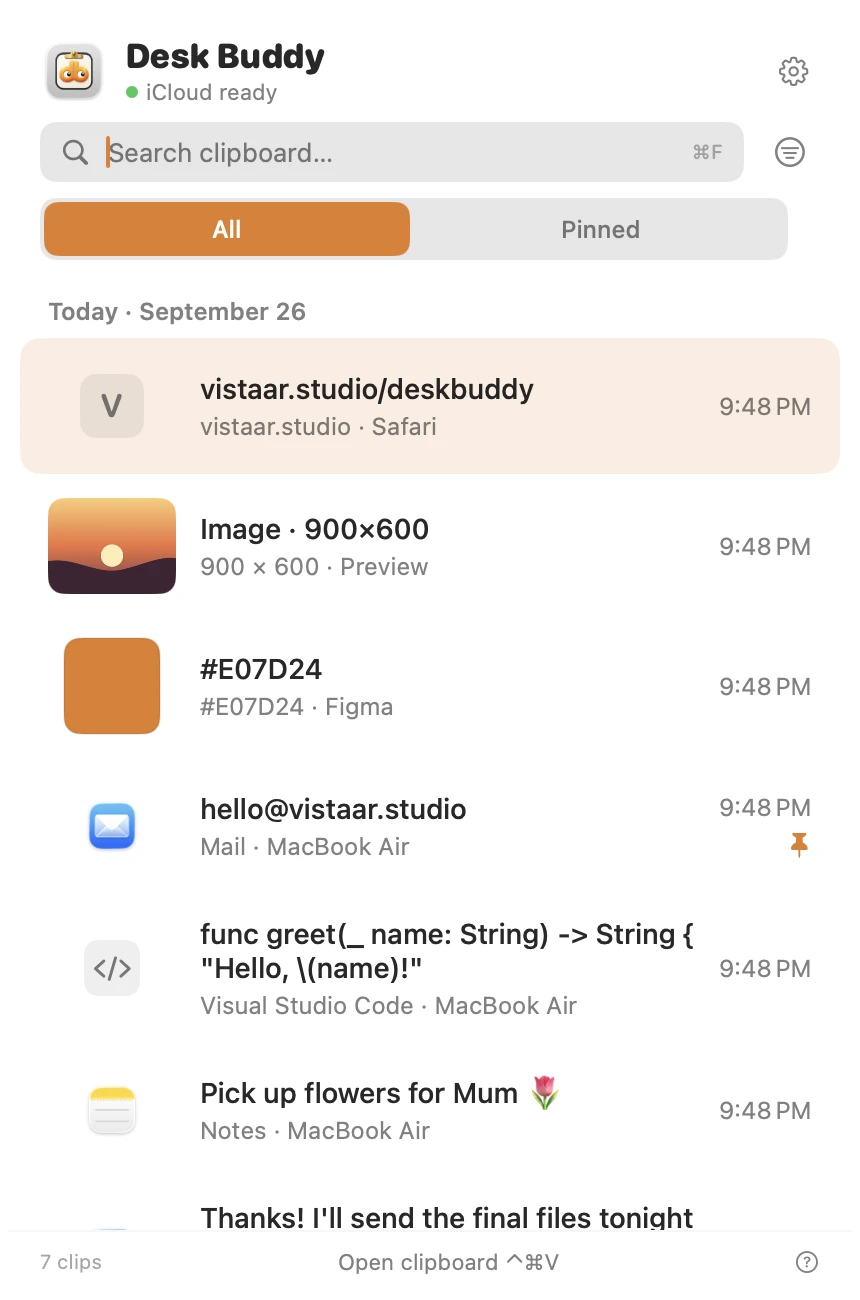
Desk Buddy is available now from vistaar.studio as Desk Buddy Complete: $5 for 1 Mac (₹499 in India), paid up front, instant download. A Mac App Store edition is coming soon: a free download with a 7-day free trial, then a $9.99 in-app unlock. It needs macOS 14 or later. Meet Desk Buddy →
FAQ
How do I reset the clipboard on a Mac?
In Activity Monitor, search for pboard, select it, click Stop (X) and Force Quit. Or run killall pboard in Terminal. macOS starts a fresh one immediately; the current clipboard contents are lost.
Do I need sudo to run killall pboard?
No. pboard runs under your own user account, so killall pboard works without a password.
Why can't I copy text from a website or PDF on my Mac?
Some pages block selection and some PDFs disallow copying. Try Safari's Reader view, or screenshot it and use Live Text.
Why does Terminal block my paste?
macOS 26.4 added a one-time warning when you paste commands copied from other apps, to protect against scams. If you trust the command, you can paste anyway.
Why does my Mac paste something I copied on my iPhone?
That's Universal Clipboard (Handoff). Turn off Handoff in System Settings › General › AirDrop & Handoff to rule it out.
Can I get back something I copied before the clipboard broke?
Not from the clipboard itself, which holds one item. Tahoe's Spotlight clipboard history (⌘Space, then ⌘4) may have recent text, and a clipboard manager keeps a longer history.